UTILITY WAREHOUSE
Smart Billing Experience
Designed the digital billing experience at Utility Warehouse to reduce support calls, clarify charges, and introduce AI-powered summaries that help users understand their bills at a glance.
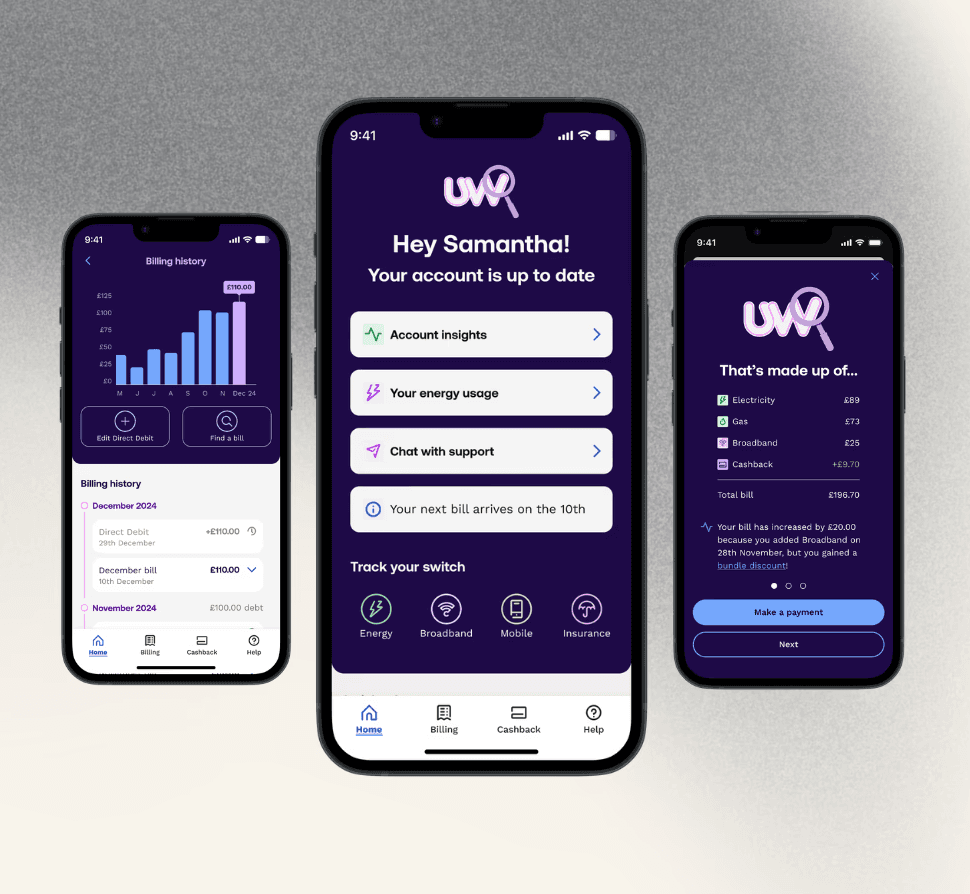
Utility Warehouse's Company Vision
To simplify life for homeowners by providing all essential services under one roof, delivering value, convenience, and exceptional customer experience through seamless integration and innovation.
The Problem
The billing experience was seen as overly complex.
Users had to download a PDF to understand their charges — an outdated and unhelpful format.
The Goal
💡Modernise billing by:
Reducing PDF reliance
Lowering support calls
Giving users a smarter, self-serve experience
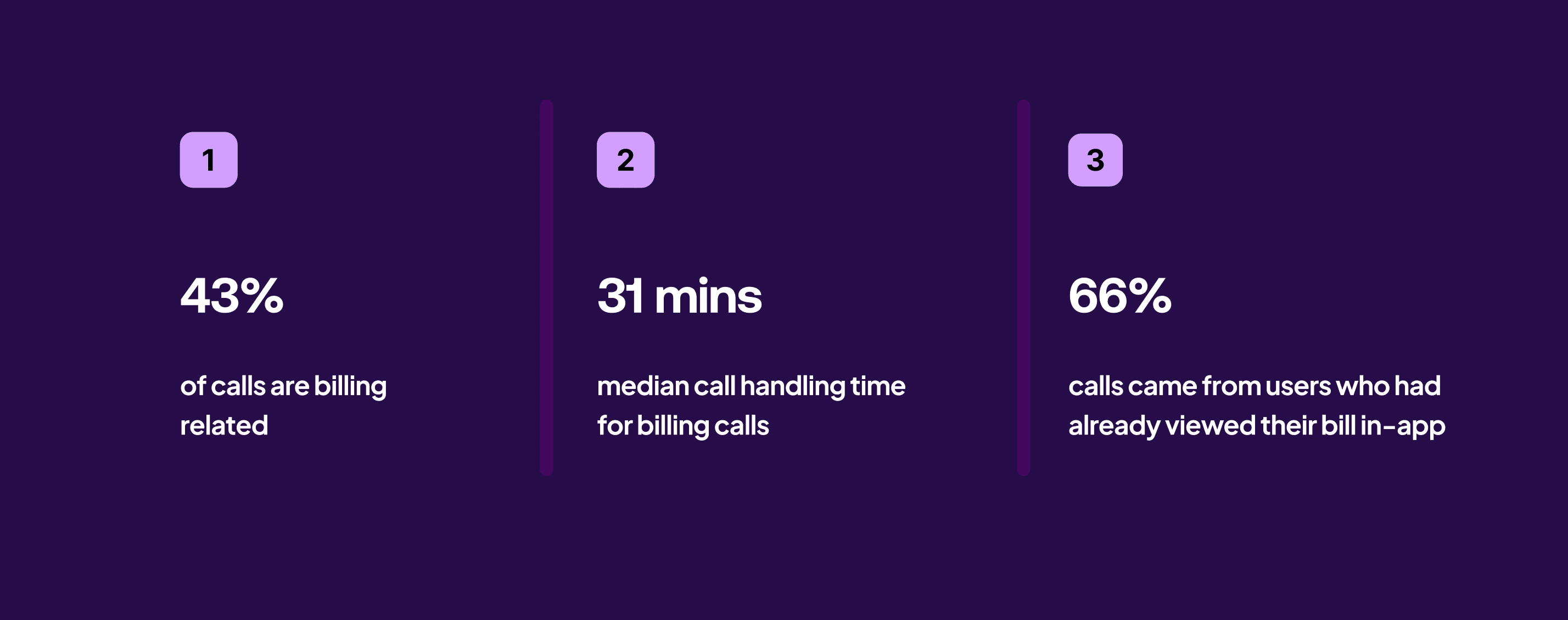
We focused on the 66% of customers who check their bill digitally before contacting support.
Deflecting up to 5% of total support calls.
Target impact
What We Achieved
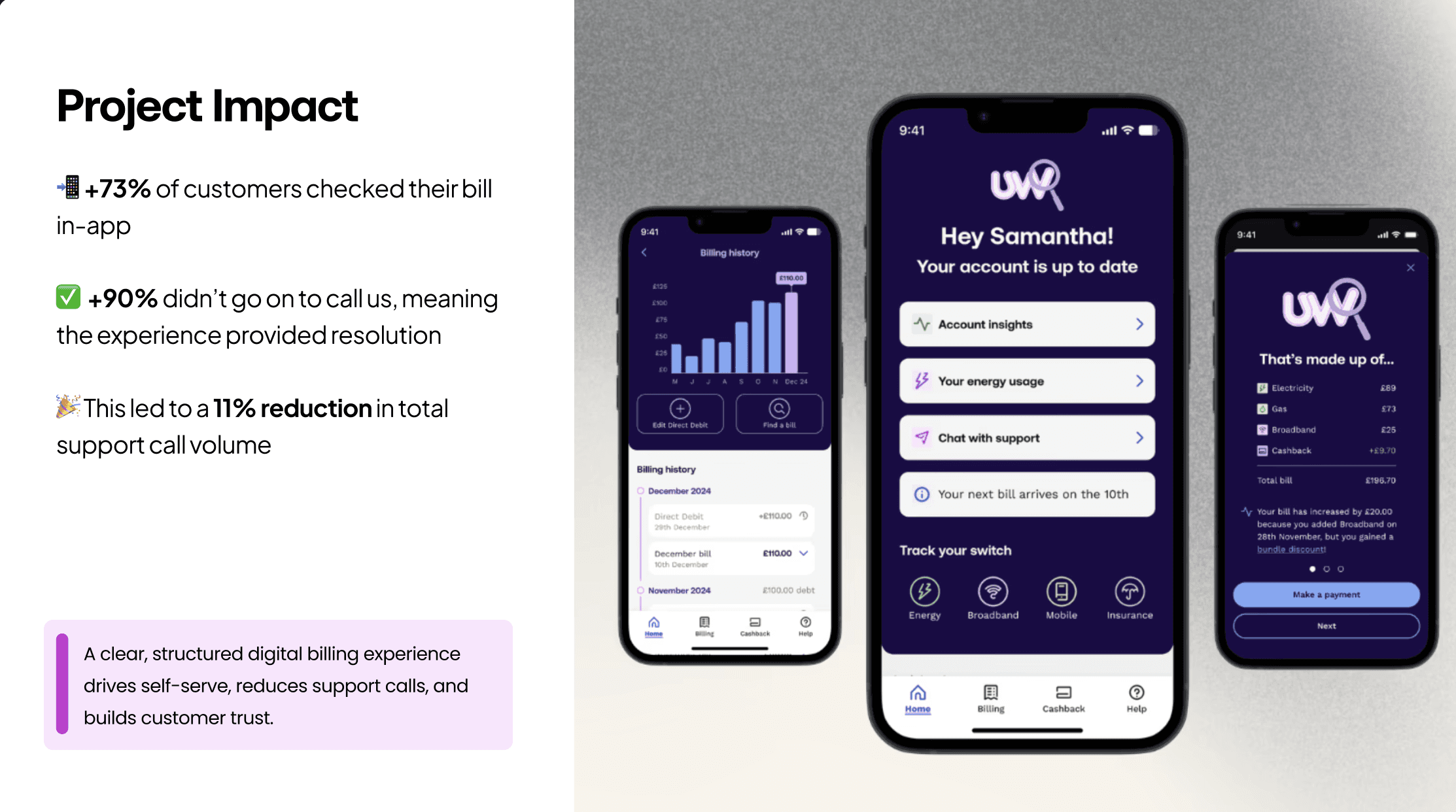
📉 11% drop in billing-related support calls
Users were able to find clear explanations without calling in.
📈 +73% increase in engagement with billing content in app
More customers viewed and interacted with their bill through the redesigned summary and insights.
💬 +36% improvement in comprehension scores (via usability testing)
Participants reported feeling more confident and understanding what they owed, why, and when.
My Role
Lead UX Designer
Process
Discover
Define
Develop
Deliver
Collaboration
Product
Engineering
Data Science
Cross Functional
Strategic Impact
Increased Customer Trust
Reduced Support Calls
Improved Retention
01 Discover
The first part of the process was to understand our users through comprehensive quantitative and qualitative research.

Analysing our Internal Call Driver Model 2.0
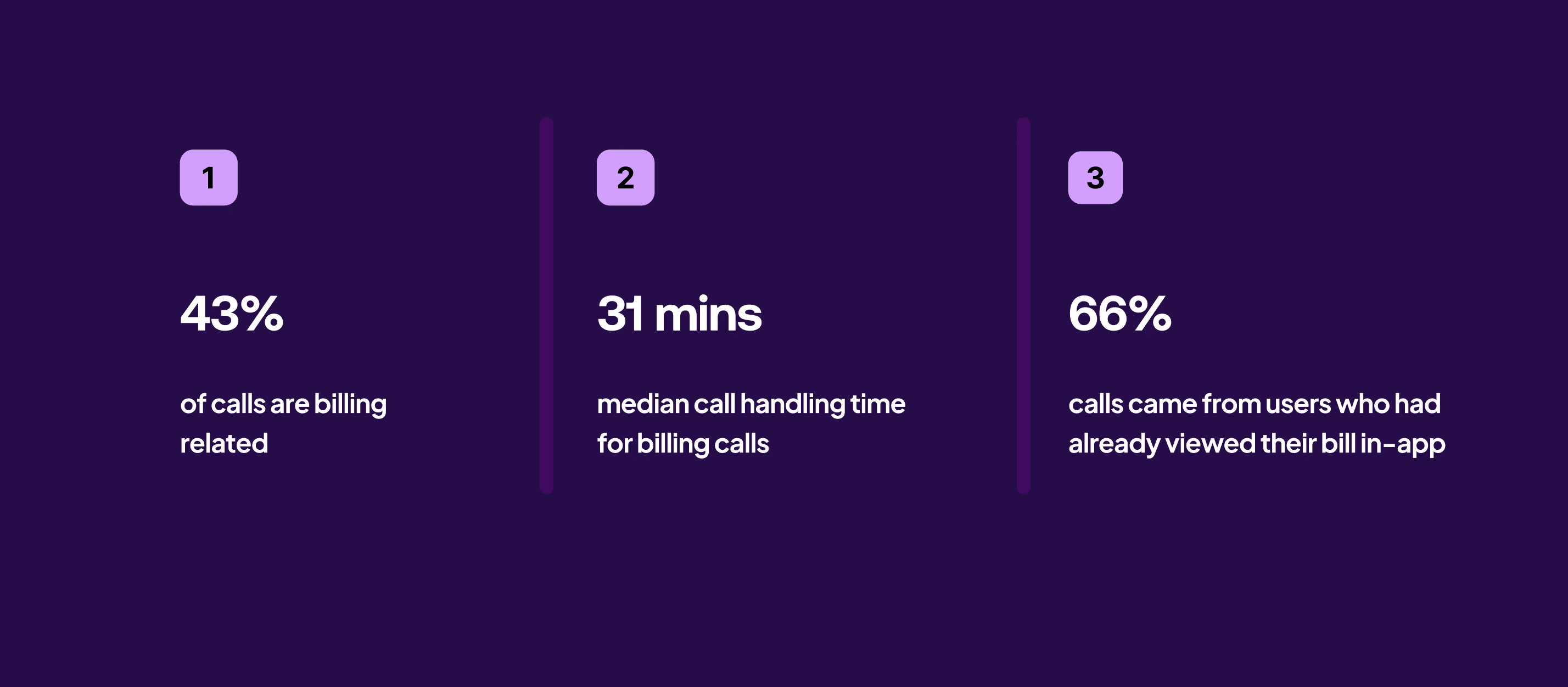
As the first step, I analysed our Call Driver Model – which segments customer support calls using OpenAI. These analytics revealed that billing queries are the highest call driver.

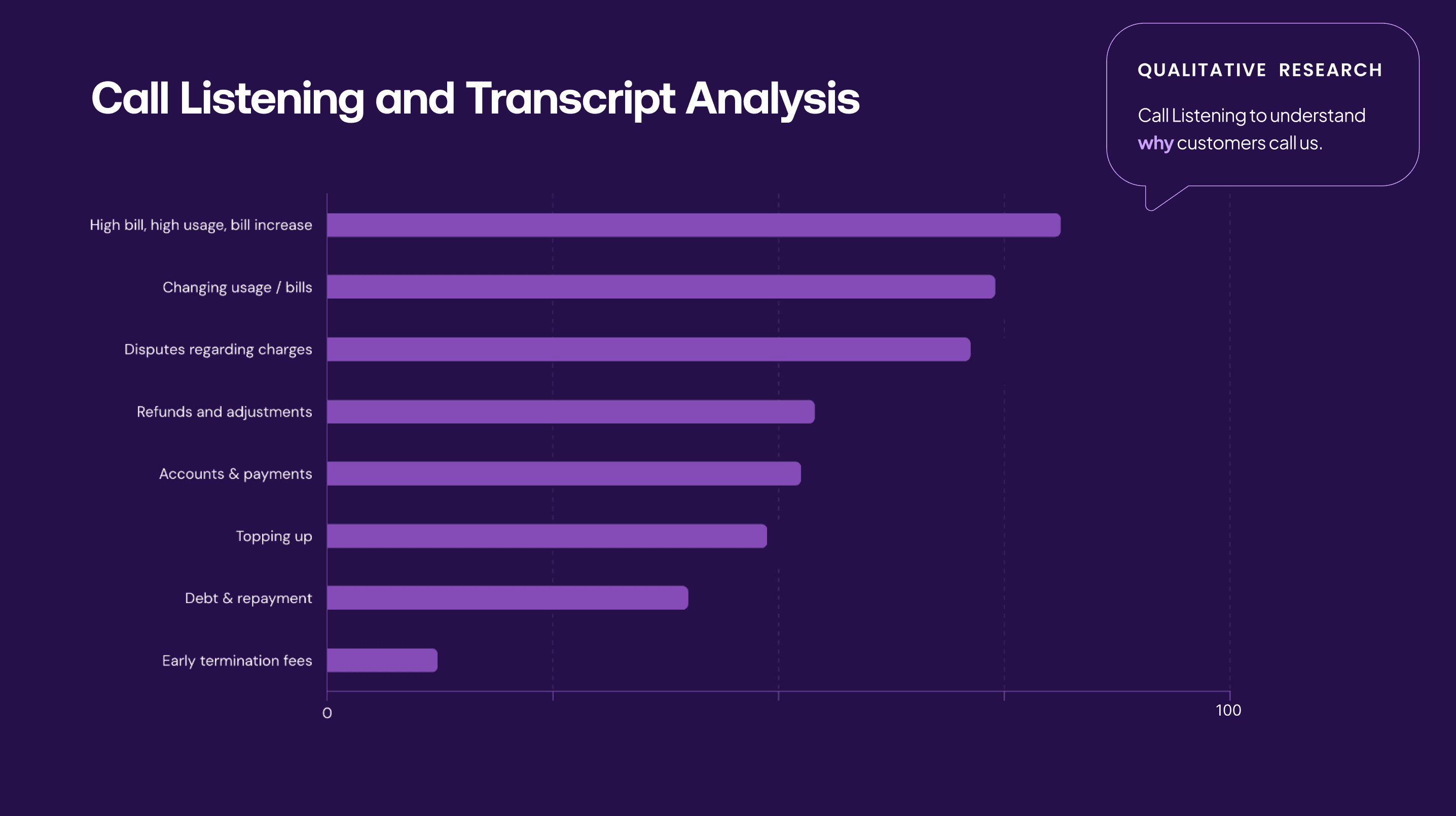
Call Listening and Transcript Analysis
Next to understand why customers were contacting support, I reviewed call recordings and transcripts.
Three clear patterns emerged:
Bill increases ▸ Customers didn’t understand why their charges had shifted.
Disputed charges▸ The experience lacked transparency.
Refunds and cancellations ▸ Customers weren’t guided on what to do next.
These findings made it clear: the existing experience was failing customers. I needed to understand how design could change that.

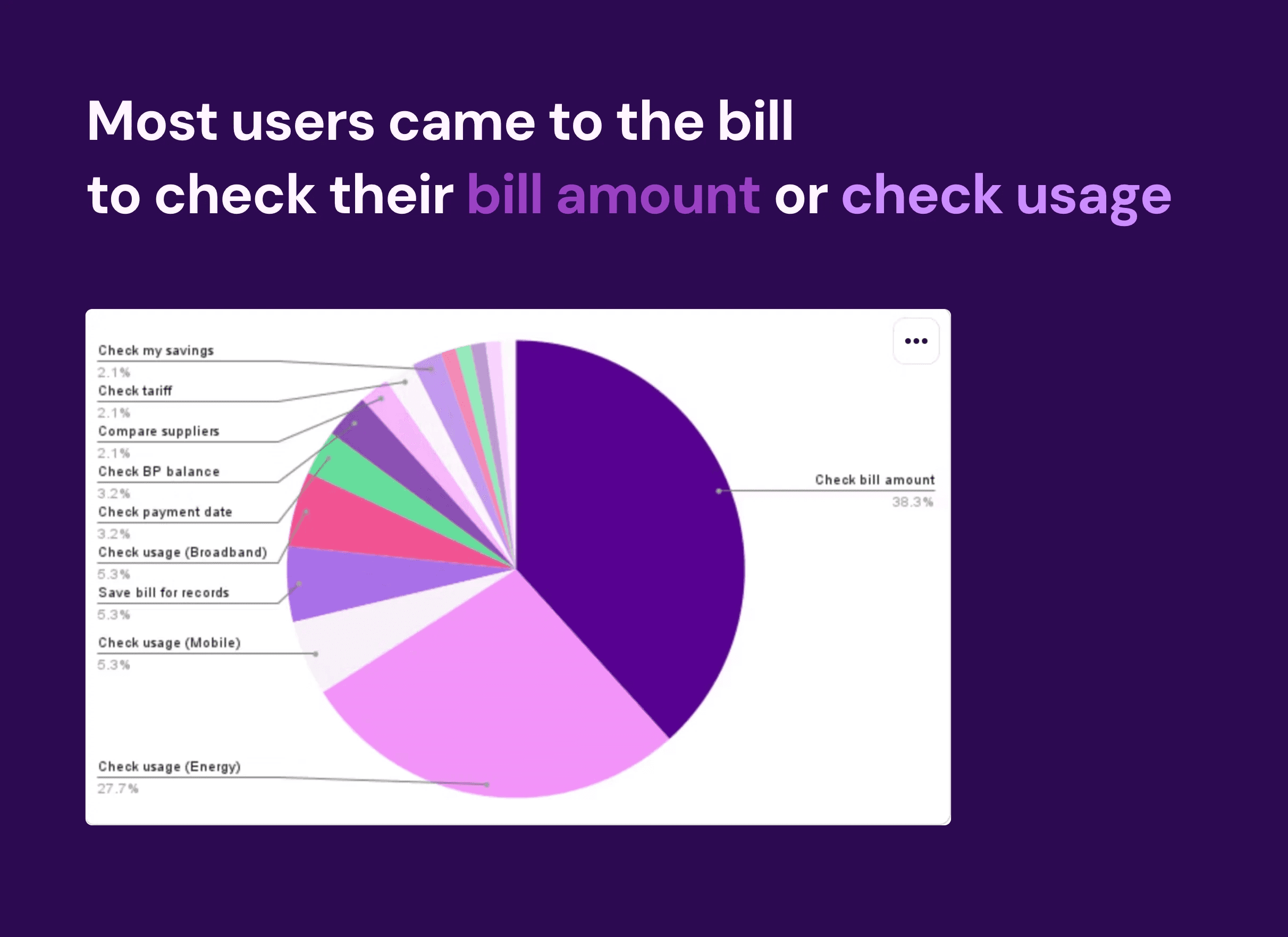
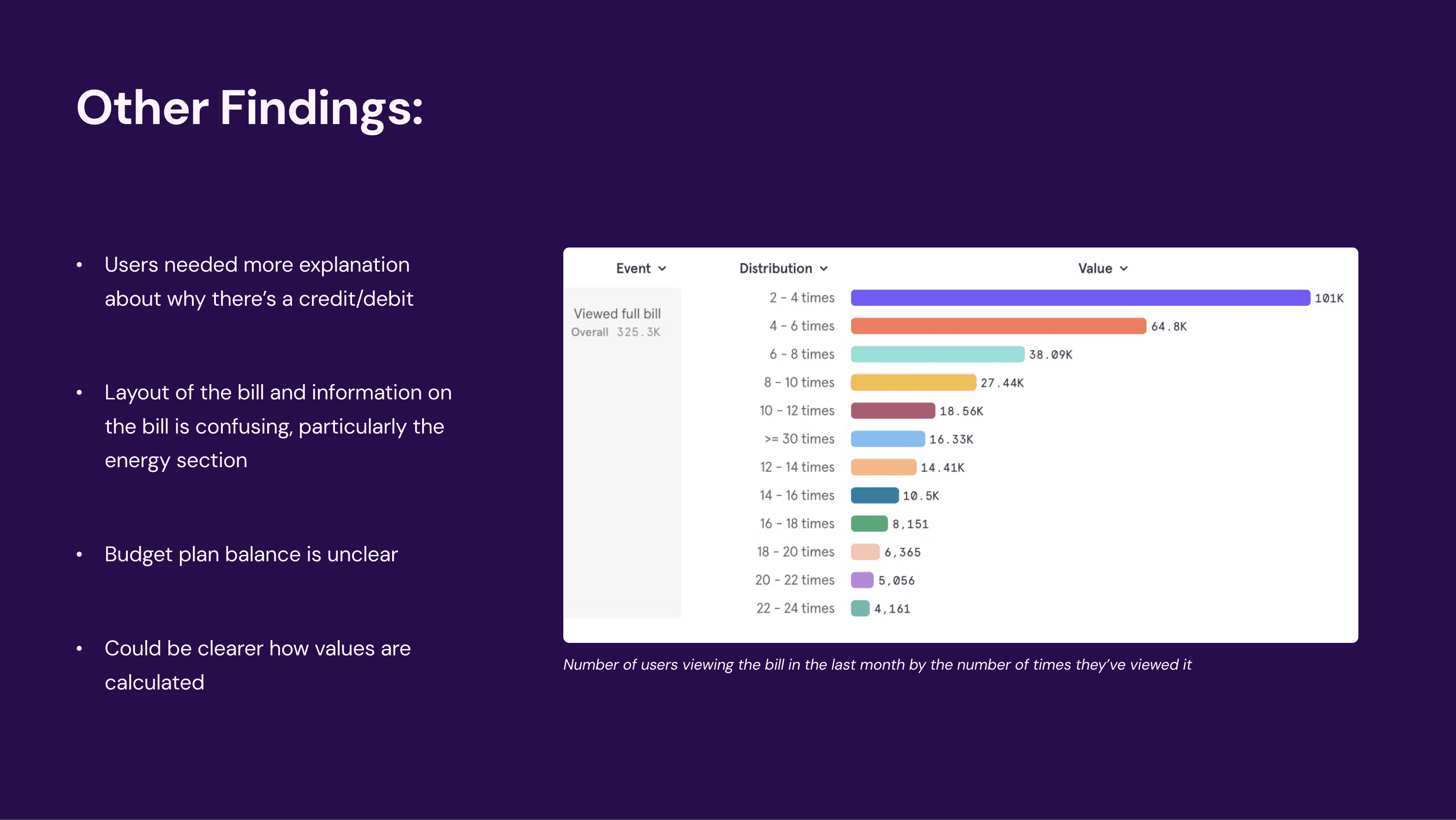
Surveying App Users
To better understand user needs, I surveyed app users to learn what they look for on their bill, what confuses them, and why some return to it multiple times in a month.
These insights helped me identify how to prioritise areas of the design.
Research Interviews
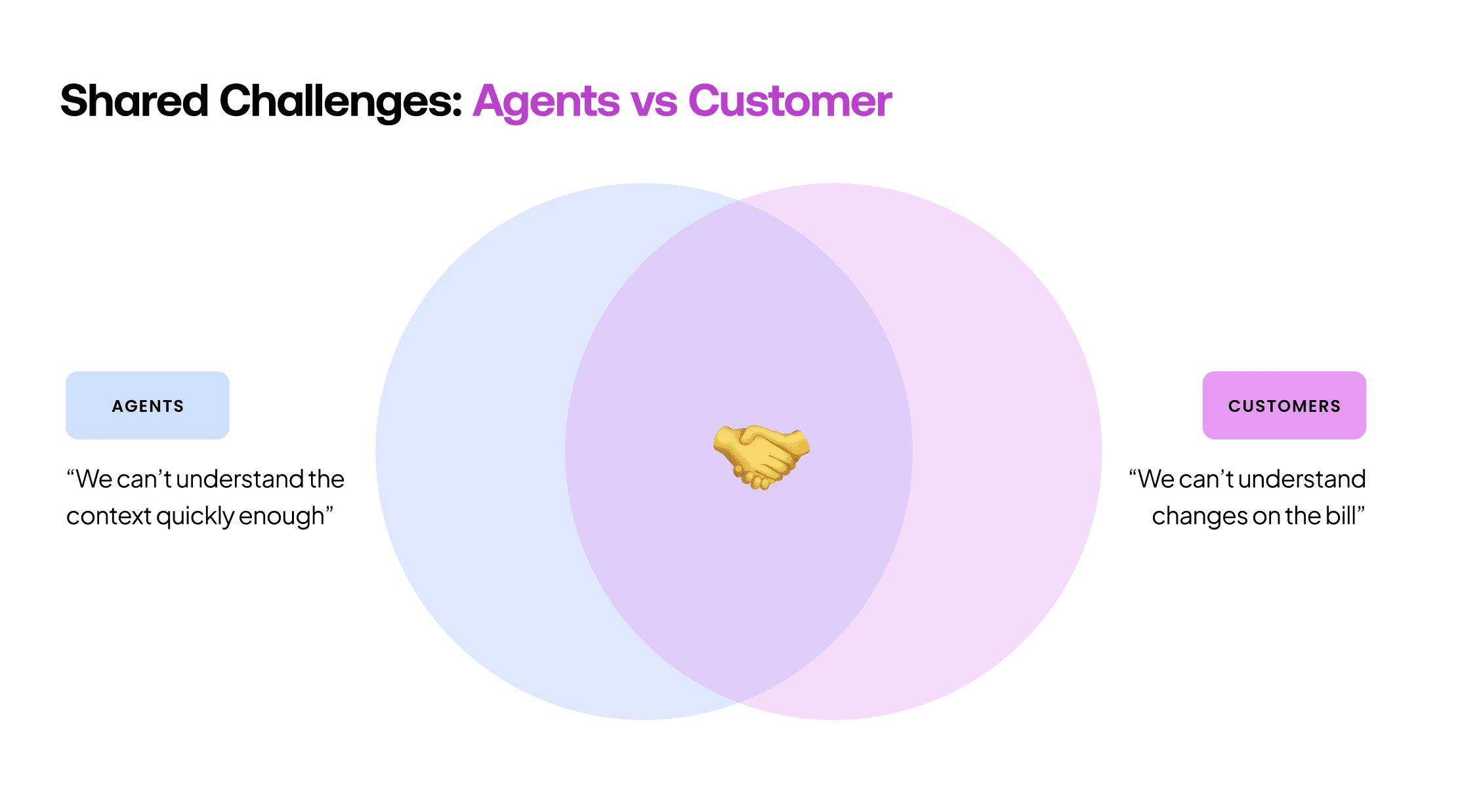
To understand why billing calls were running long, I interviewed both customers and support agents.
When mapped together, both pointed to the same underlying issue: a lack of speed in understanding.
This insight became the core problem my designs needed to solve.
Evaluating the Current Billing Experience
I conducted a UX audit of the current billing experience following our research phase.
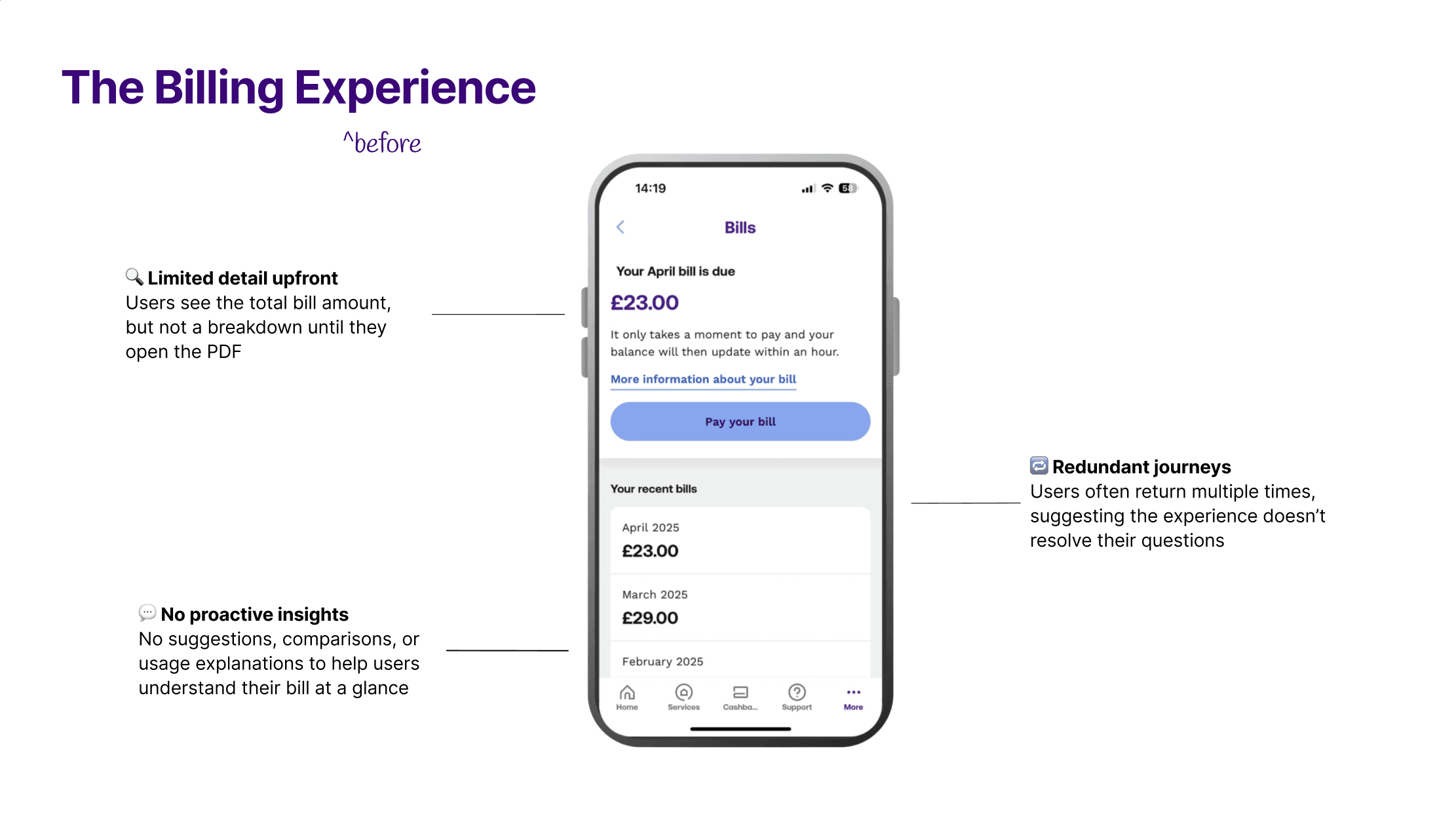
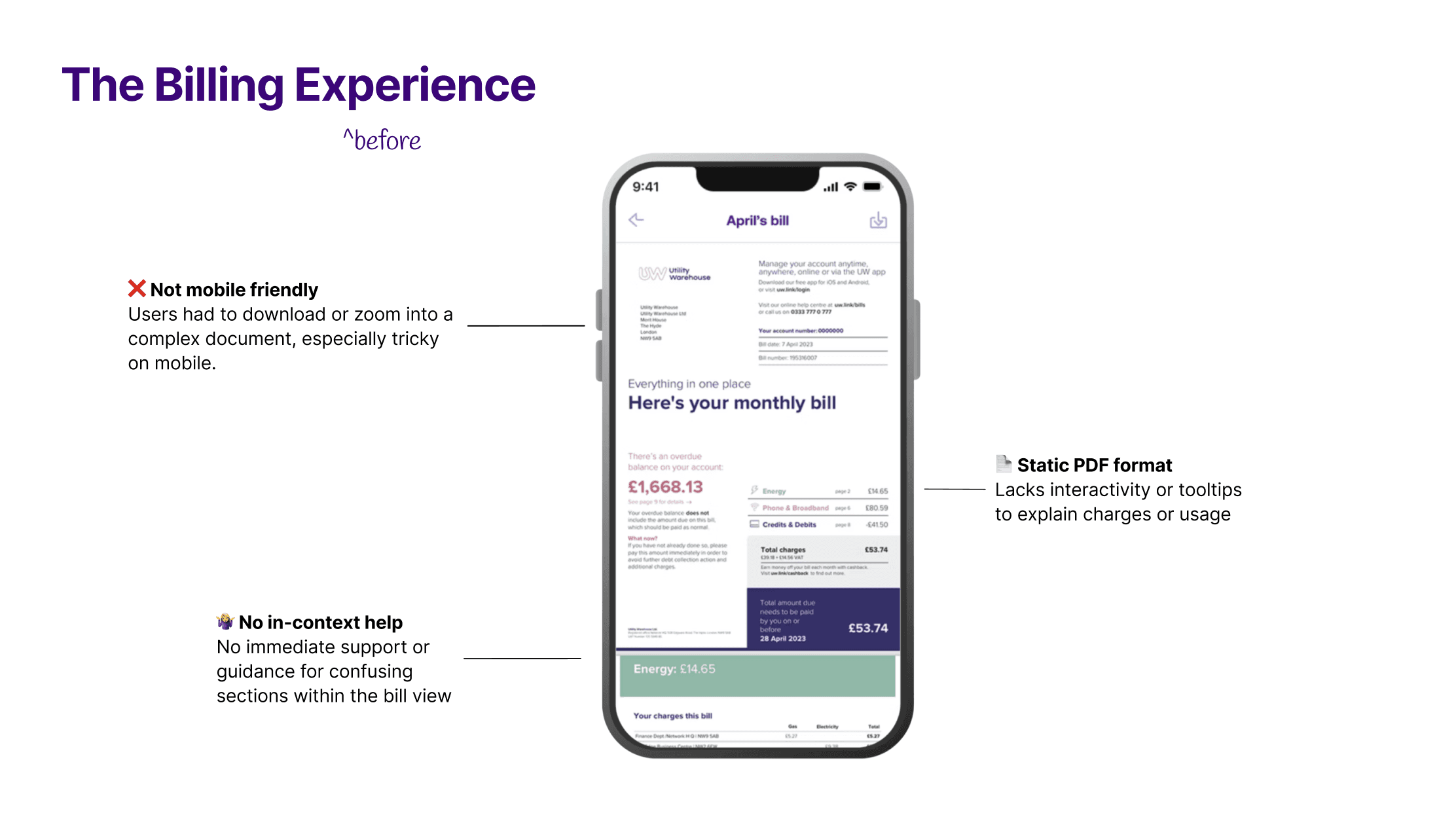
Billing had been treated as an afterthought in the app, yet for customers it was a core part of their experience. As a squad, we knew this was something we had to change.
02 Defining The Problem
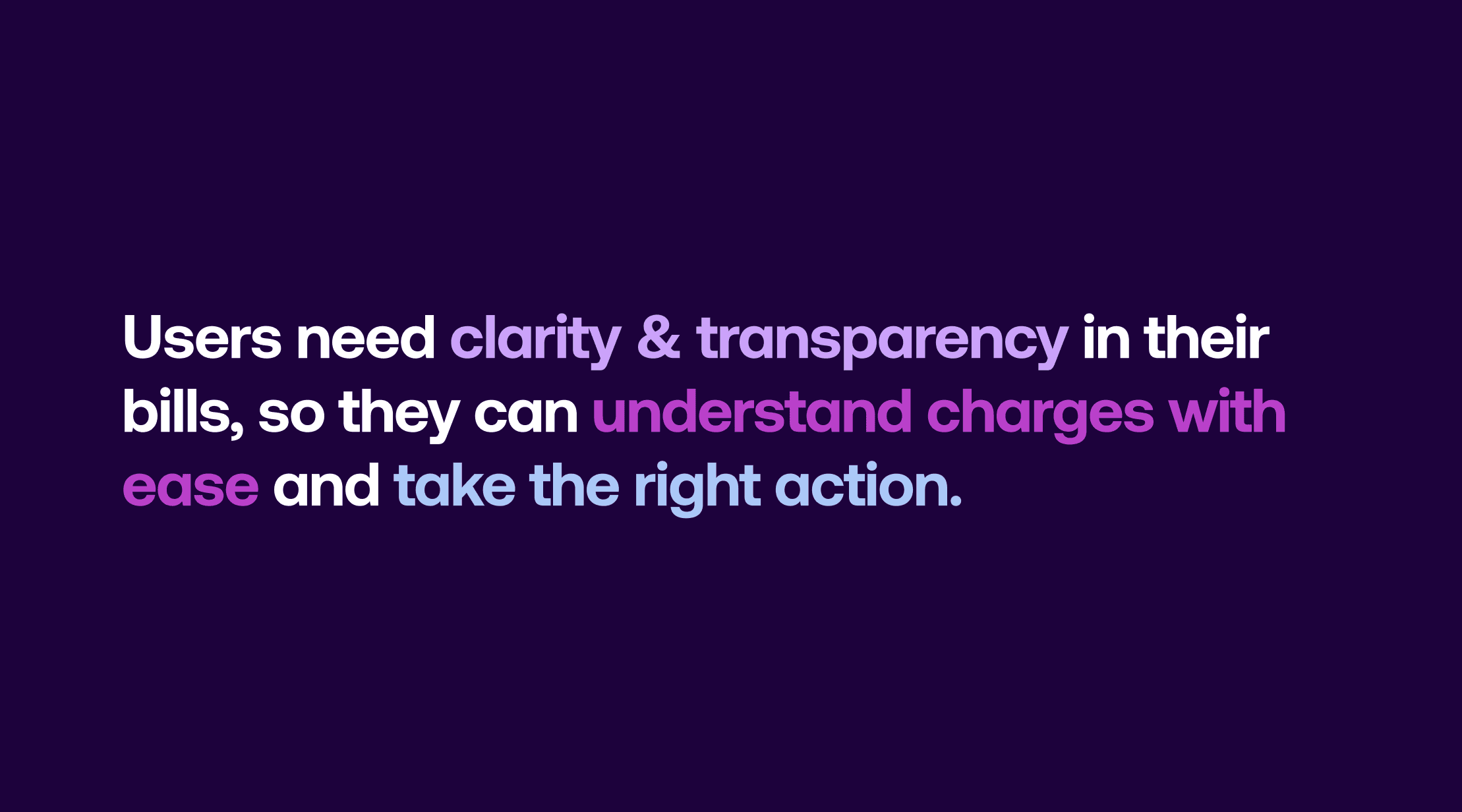
The research helped me thoroughly understand the problem space and identify a clear problem statement:
Business Opportunity Analysis
Post-discovery, we as a squad understood the problem space well.
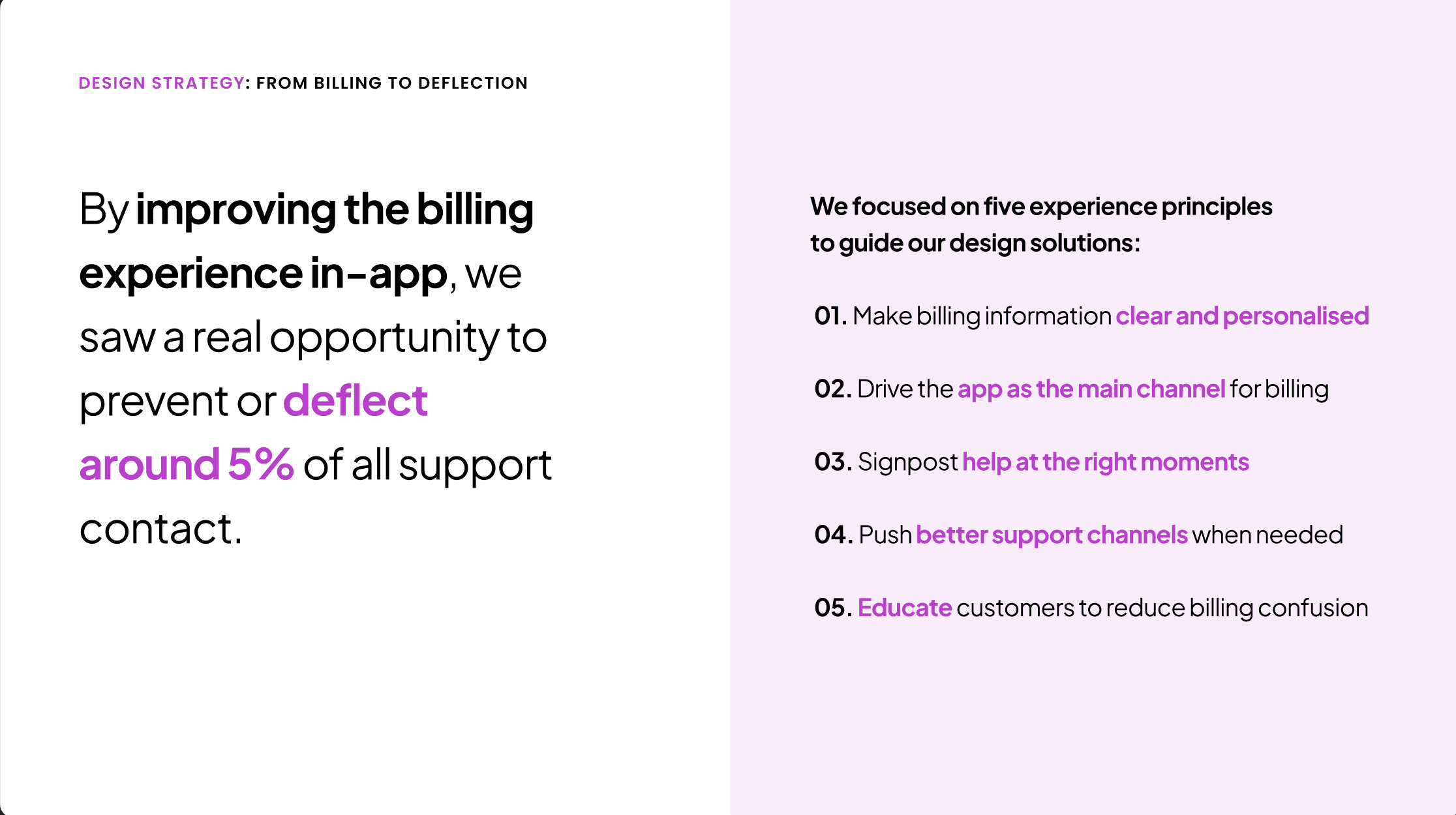
We knew we had to bring a fully considered billing experience into the app — by doing so, we could better contain the 66% of customers already checking their bills there, deflecting around
5% of all support contact.
To guide our solutions, I worked with product to define five design principles:
Design Solutions

Design Solutions
Design Solutions
Design Solutions
Design Solutions
Design Solutions
Design Solutions
Design Solutions
Design Solutions
Design Solutions
Design Solutions
Design Solutions
Design Solutions
Design Solutions
Design Solutions
Design Solutions
Design Solutions
Design Solutions
Design Solutions
Design Solutions
Design Solutions
Design Solutions
Design Solutions
Design Solutions
Design Solutions
Design Solutions
Design Solutions
Design Solutions
Design Solutions
Design Solutions
Design Solutions
Design Solutions
Design Solutions
Design Solutions

Key Design Decisions
📲 #1 AI Summary Splash Screens
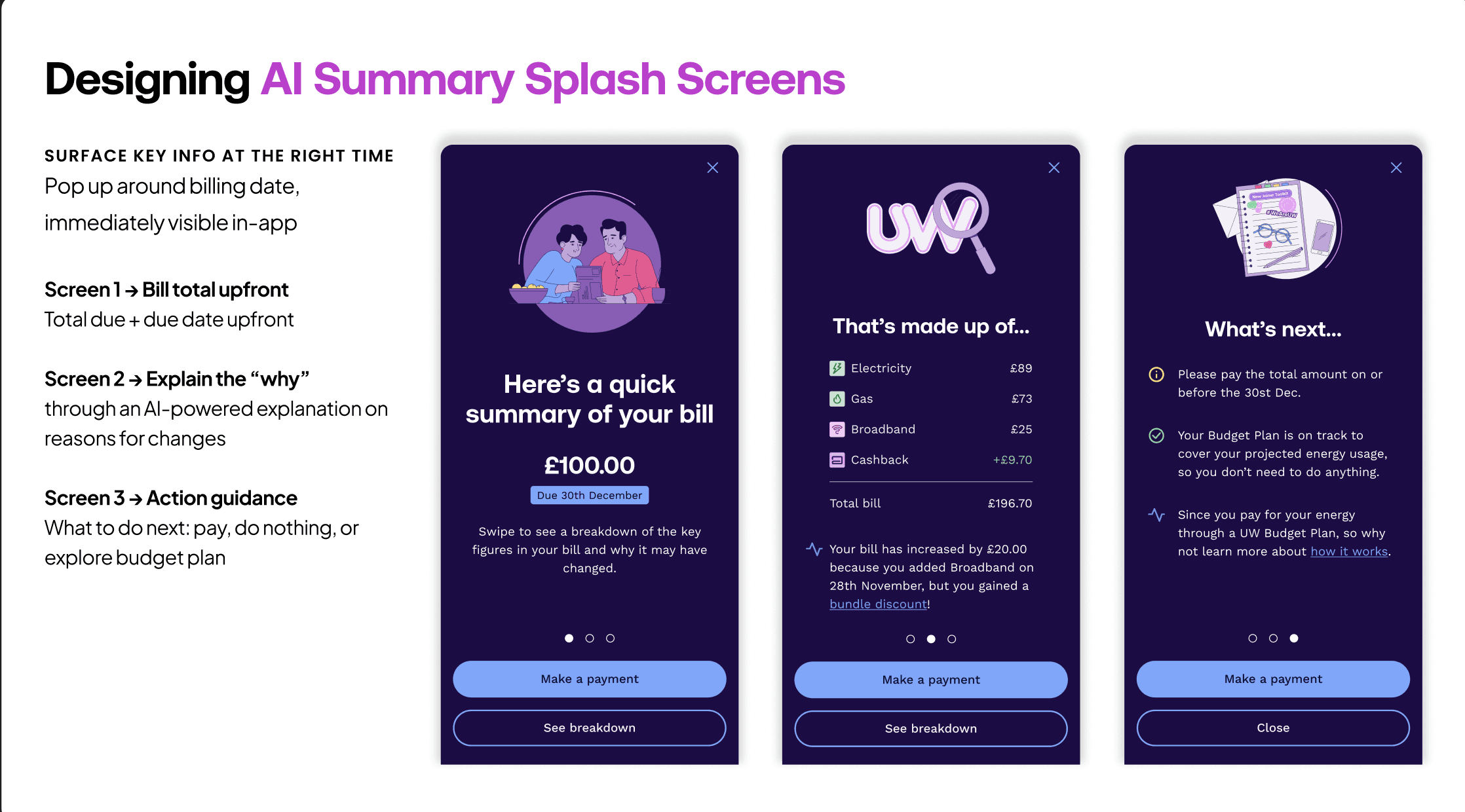
I designed the screens below to bring our strategy to life:
Bill total upfront: Users see their total and due date immediately.
Breakdown + AI insight: We show a clear breakdown and personalised AI-powered explanation to deliver on our goal of personalisation.
Clear next steps: Guidance on what to do next, to align with our principle of proactively educating customers.
THE PROBLEM
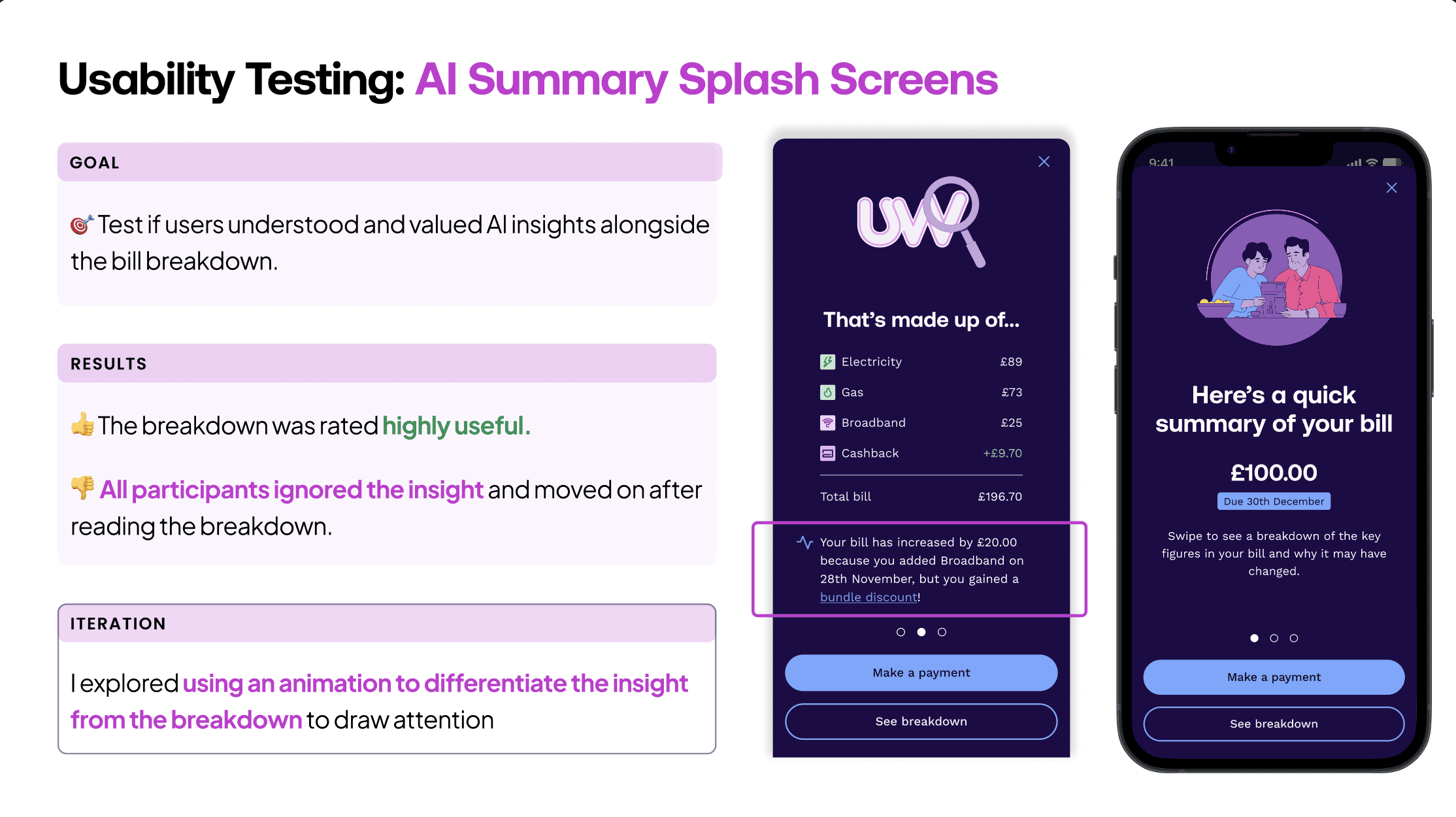
When testing this with UW customers, we found that:
✅ Breakdowns and "Next Steps" worked well
❌ AI insight was missed
THE SOLUTION
To improve this, I designed a typewriter-style animation and retested:
✅ Users noticed the summary and found it to be valuable.
Therefore, we standardised this animation across the app solely for presenting the AI summaries.
👩🏻🔬 Background: Training the AI
I partnered closely with Data Science on prompt design, bringing customer insights from discovery to shape expected outputs. The model was trained to compare past and current bills, then summarise the changes.
Accuracy was validated first with billing experts, then with customer support agents who confirmed, it improved speed to context 🎉
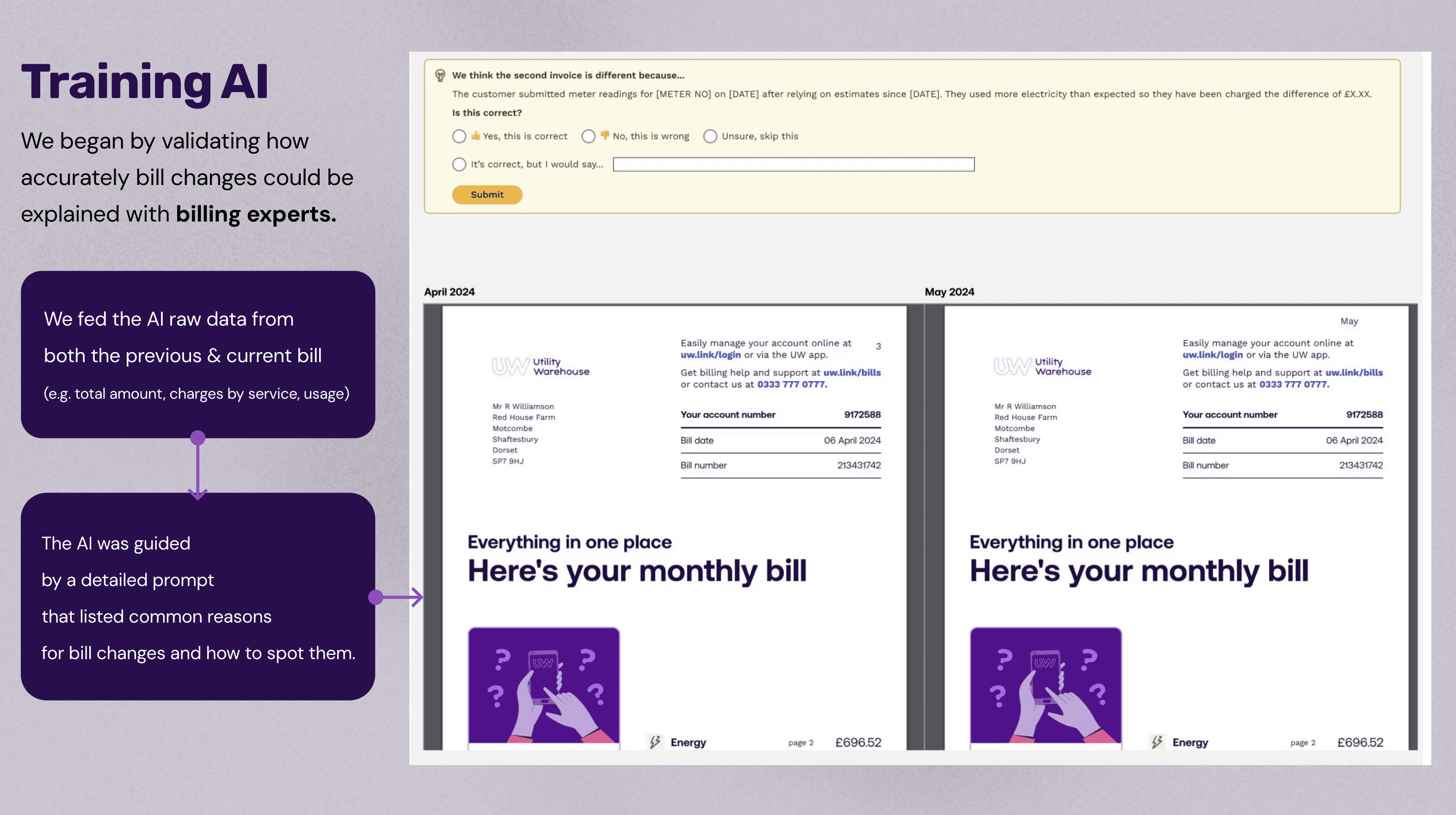
Once we passed an 80% success rate, we were ready to design our first in-app experiment.
🧪 AI Summary Experiments
Experiment 1: Help Centre Pilot
Our first experiment was a simple design placed in the Help Centre, where customers were already seeking billing support.
We targeted 5% of customers whose bills had fluctuated by more than 10%.
The results were encouraging: around 80% of customers who saw the summary didn’t call support, showing real resolution.
A few inaccuracies appeared, but this was expected as quality improves with use and time.
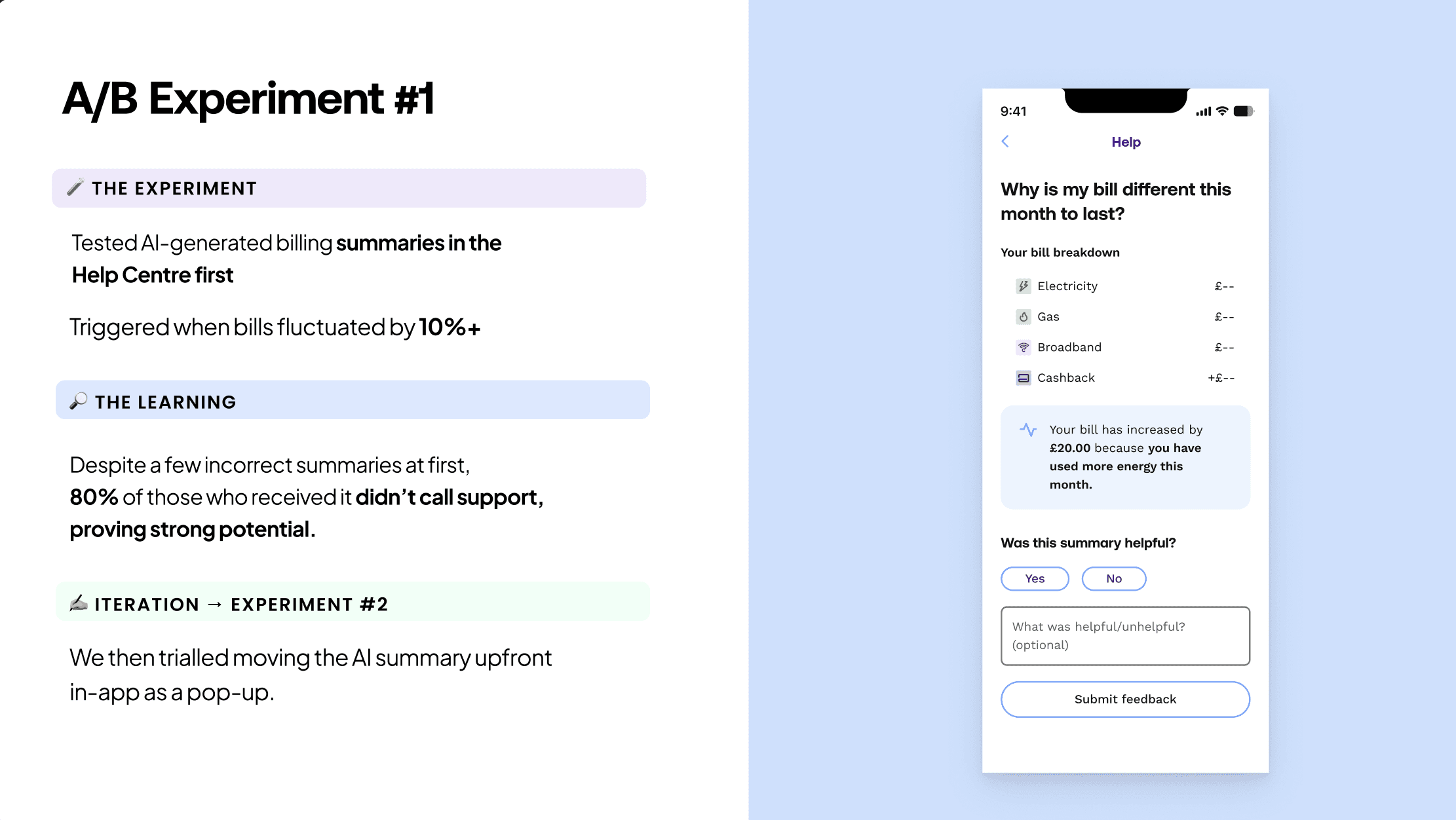
Next, we placed the summaries upfront in the app as originally designed and rolled out to another 5% of customers.
#3 Designing High-priority Actions
THE PROBLEM
We needed customers to act with urgency, but testing showed this wasn’t coming through.
So I explored different CTA styles (shown below), but the key learning was clear: urgency wasn’t about button style, without proper hierarchy, actions didn’t land.
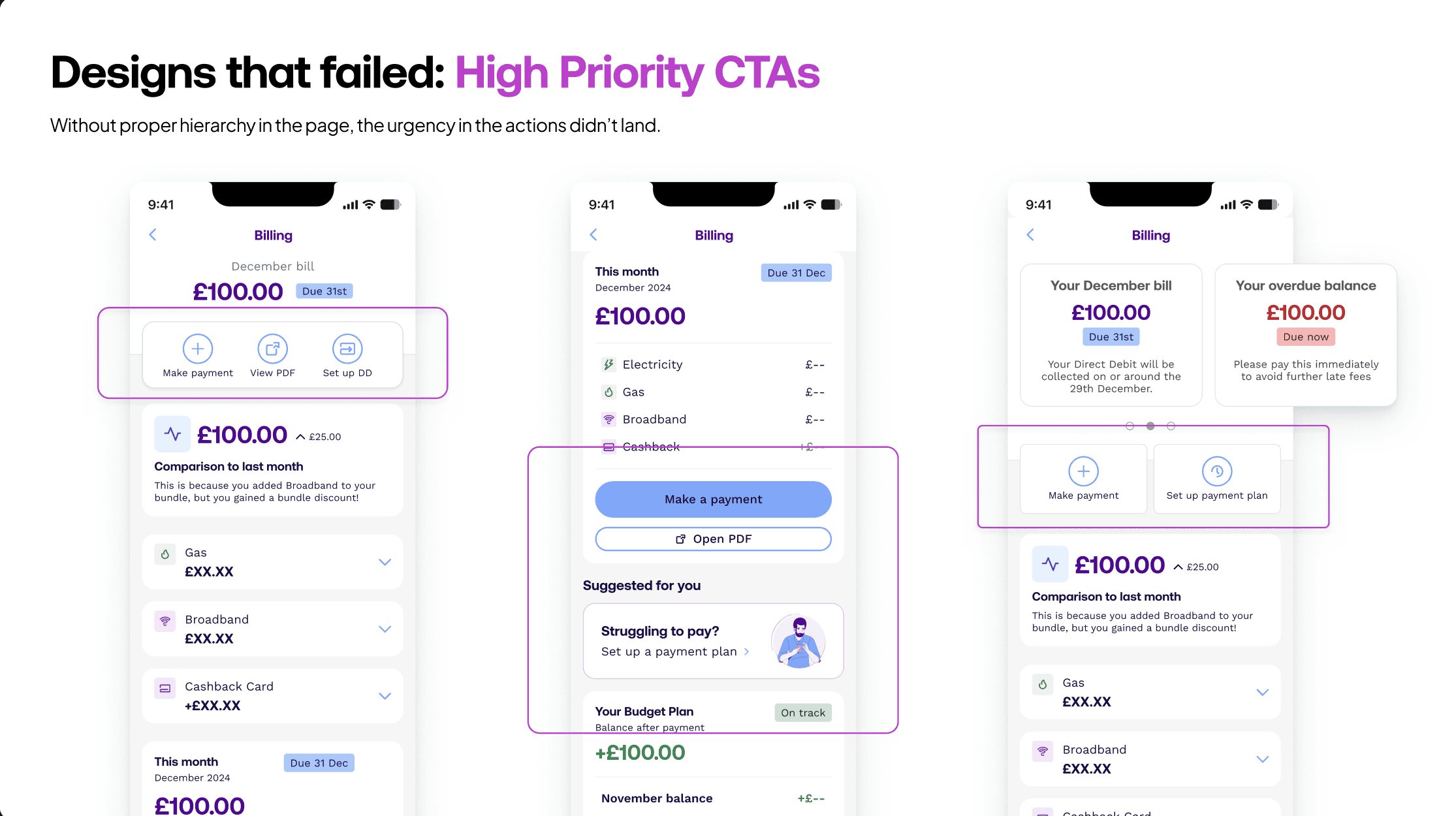
THE SOLUTION
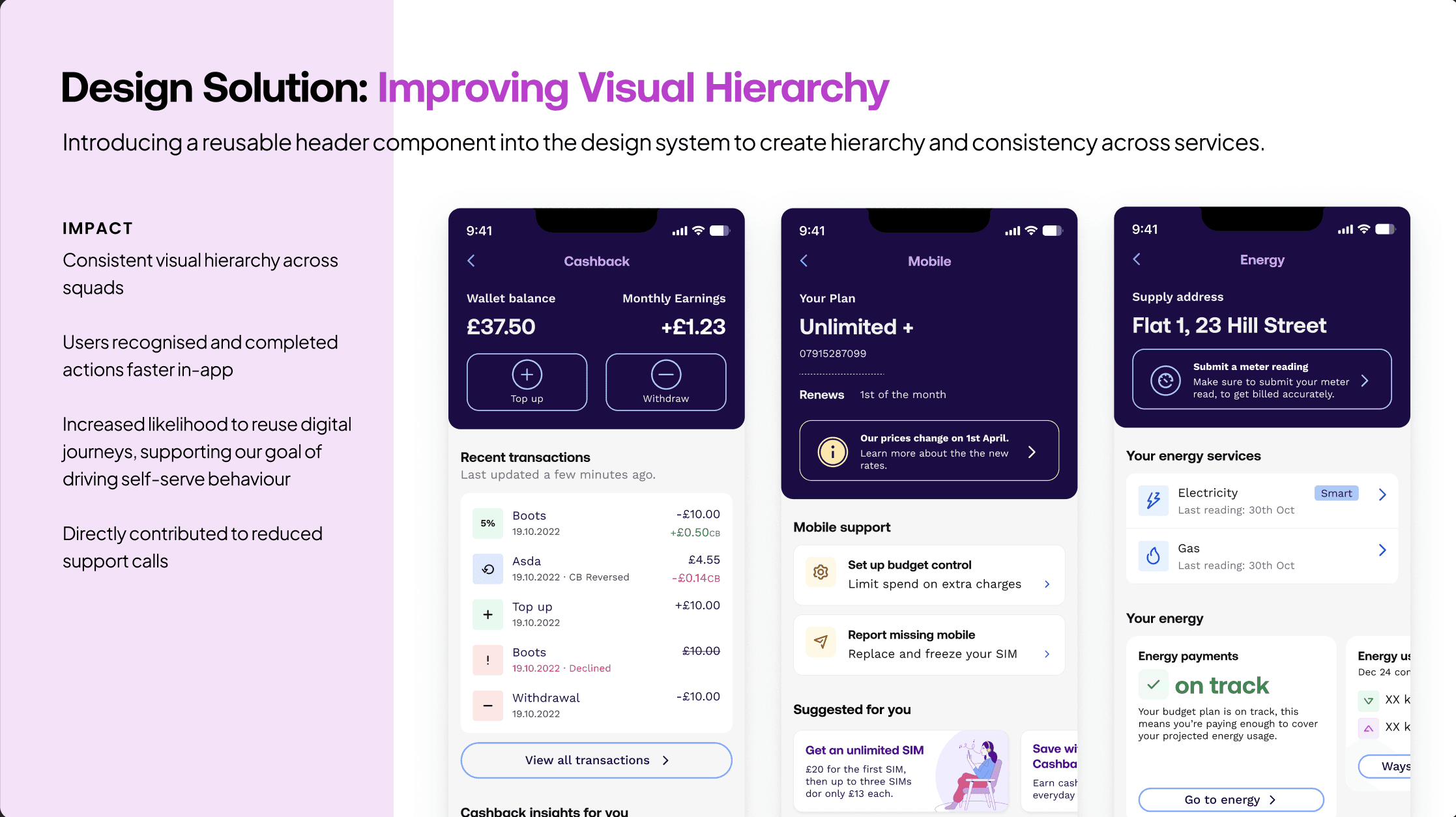
We introduced a UW purple header (see below) as a quick, scalable way to create hierarchy.
It flexed across billing use cases:
Main page -> totals and key actions
History -> trends and bill lookup
Insights -> proactive prompts
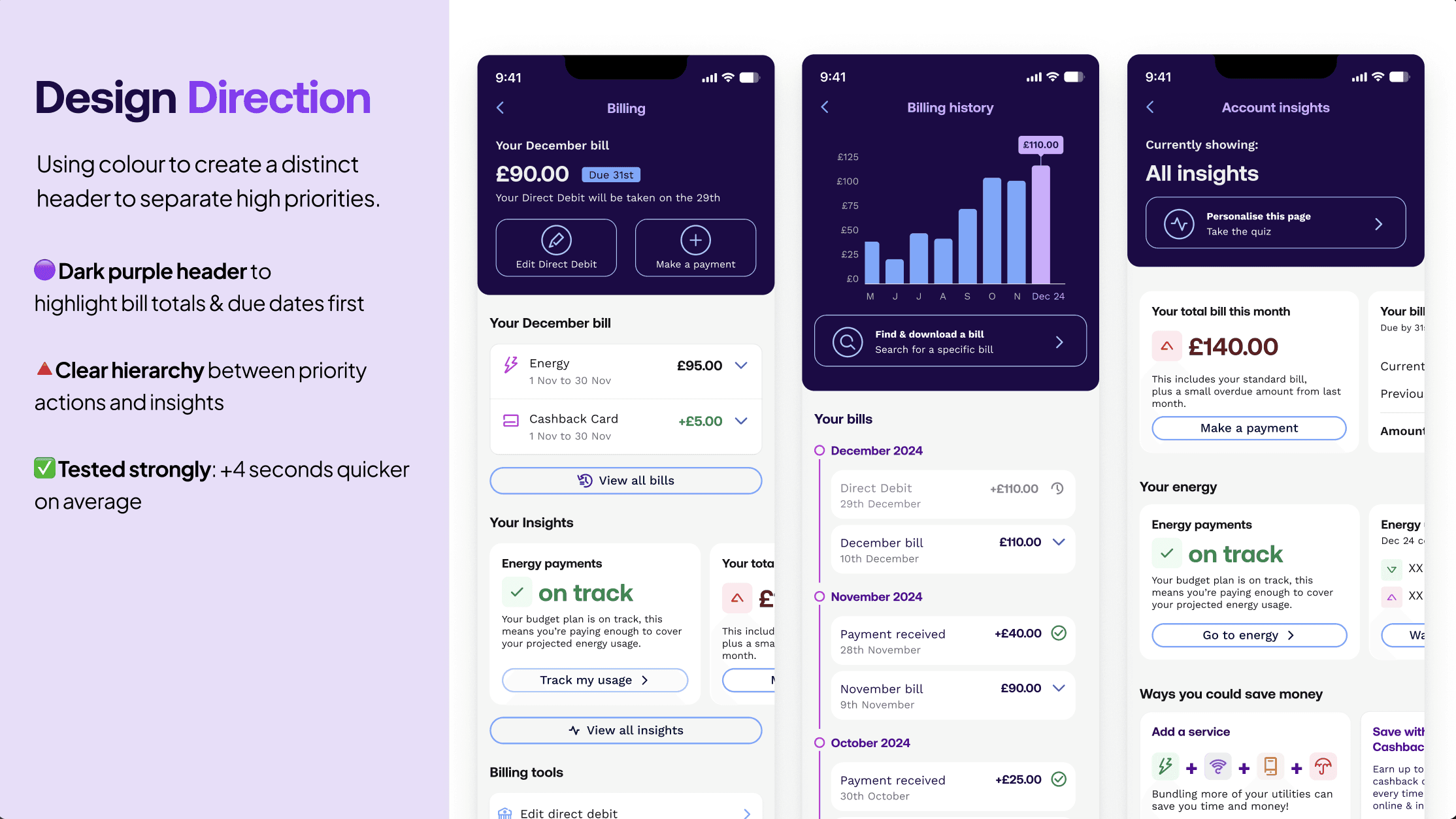
✅ In testing, this version delivered the fastest task completion rates — users recognised and acted on priorities immediately.
DESIGN SYSTEM CONTRIBUTION
After collaborating with the design systems team, I contributed this header component to the App UI library with usage guidelines, giving squads a consistent space to surface key actions such as top-ups for the Cashback space or urgent price changes for Mobile.
END RESULT
🎉 This design made self-serve far easier across services, directly supporting our goal of reducing support calls.
#4 Adding Billing to the Bottom Navigation
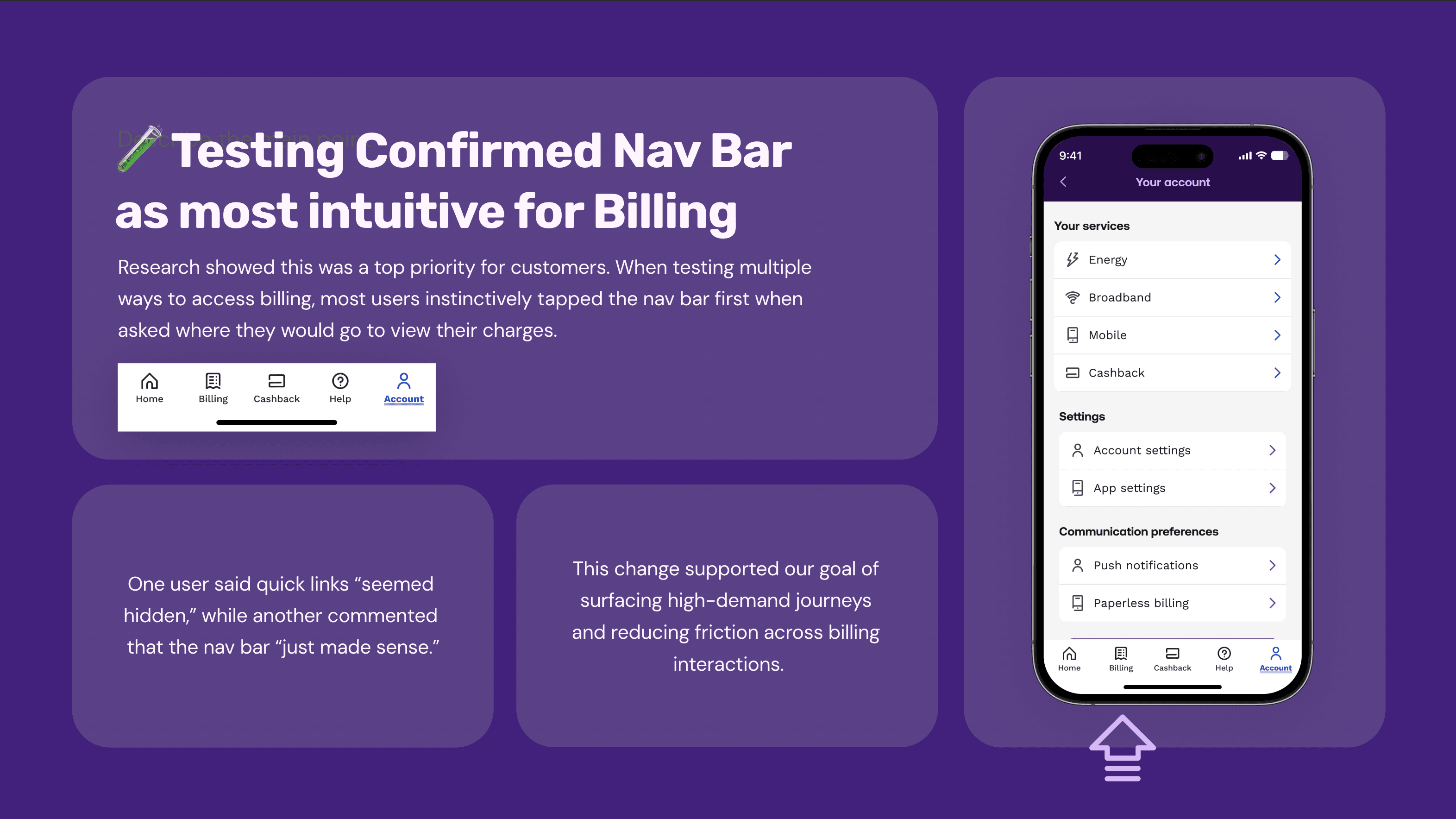
To make billing more accessible, we introduced a dedicated Billing tab in the app’s bottom navigation — positioning it alongside other core journeys such as Home, Help and Cashback Card.
📈 #2 In-APP Billing Insights
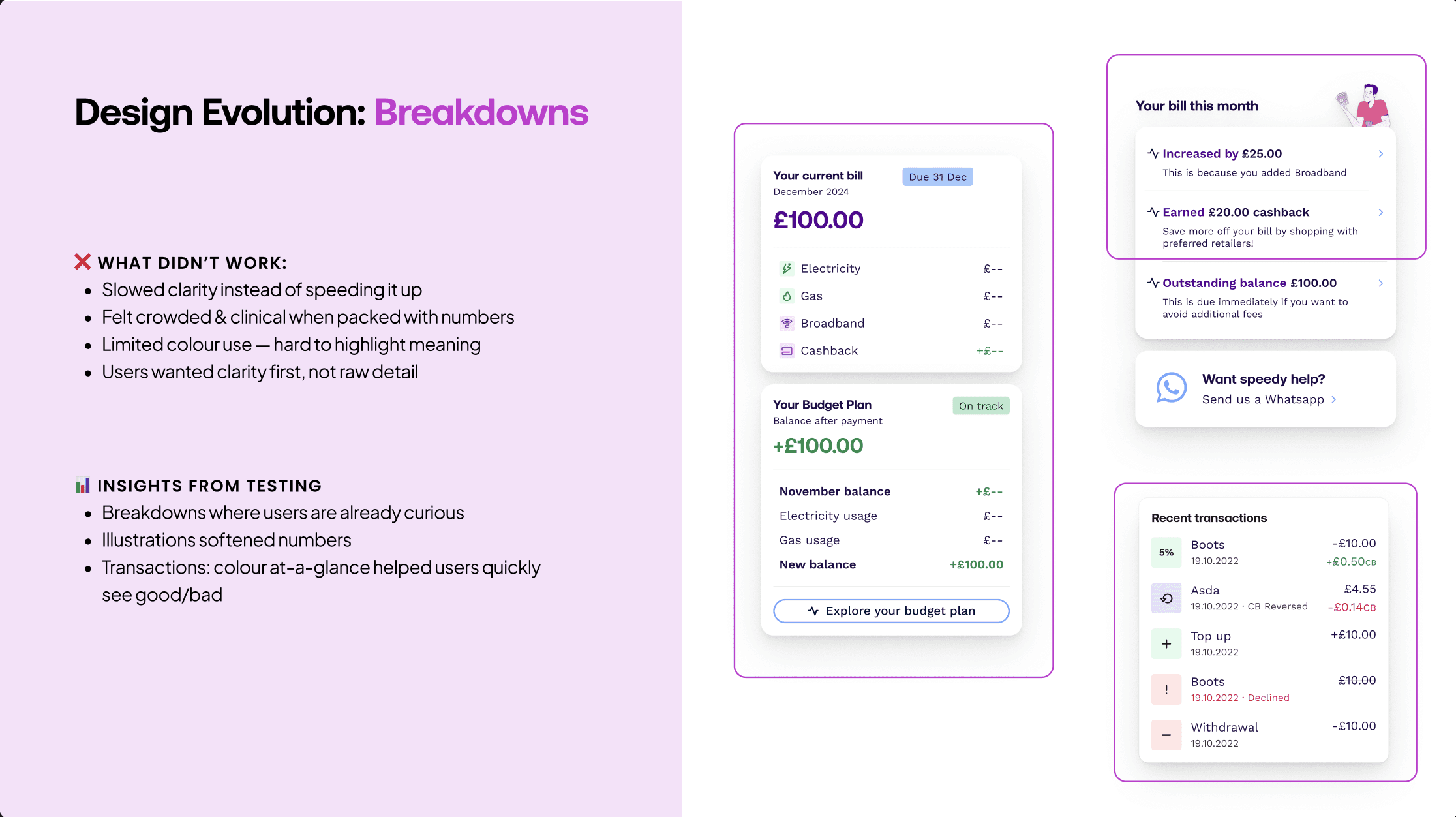
I designed an Account Insights space to surface explanations, comparisons, and recommendations.
🎯 Design goal: increase speed of understanding.
✍️ ITERATING THE DESIGN
After gathering the insights from testing, I designed for the most complex scenario first.
To break this down, I explored a few layout patterns, but each one highlighted a clear usability issue.
Scrollable cards
A swipeable set of cards for each balance.
⚠️ What went wrong: Users couldn’t see how the balances related to each other, so they struggled to understand the bigger picture.
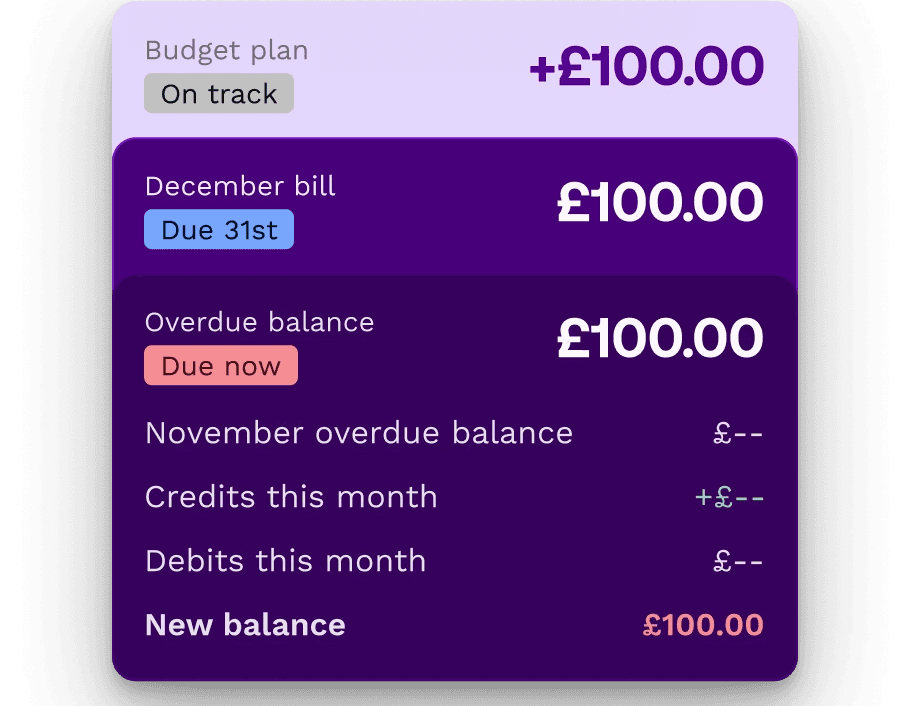
Card Stacks
A vertical stack of breakdown cards.
⚠️ What went wrong: Users still couldn’t understand the relationship between the balances at a glance.
Timeline Cards
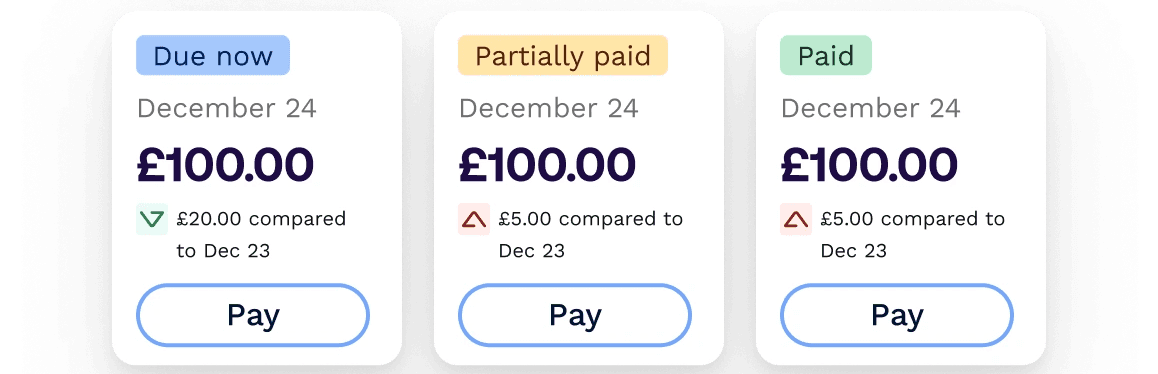
A linear, month-by-month timeline of balance changes.
⚠️ What went wrong: It worked for billing, but completely fell apart when scaled across multiple services.
Short Story Cards
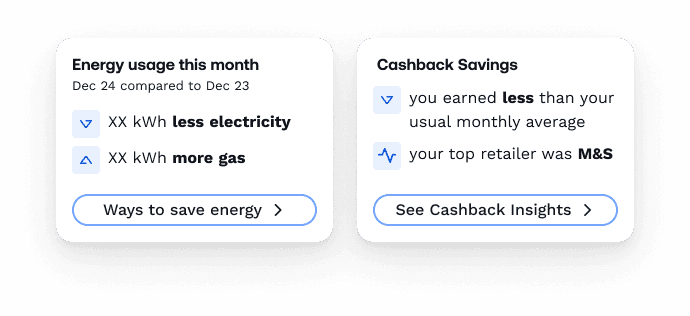
Focused on meaning over numbers.
✅ In testing, users quickly understood and could repeat back what they’d learned. This “short story” approach became the breakthrough.
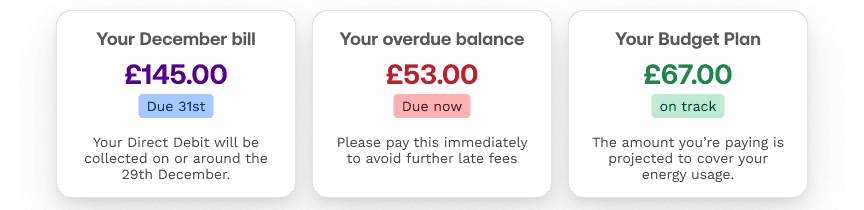
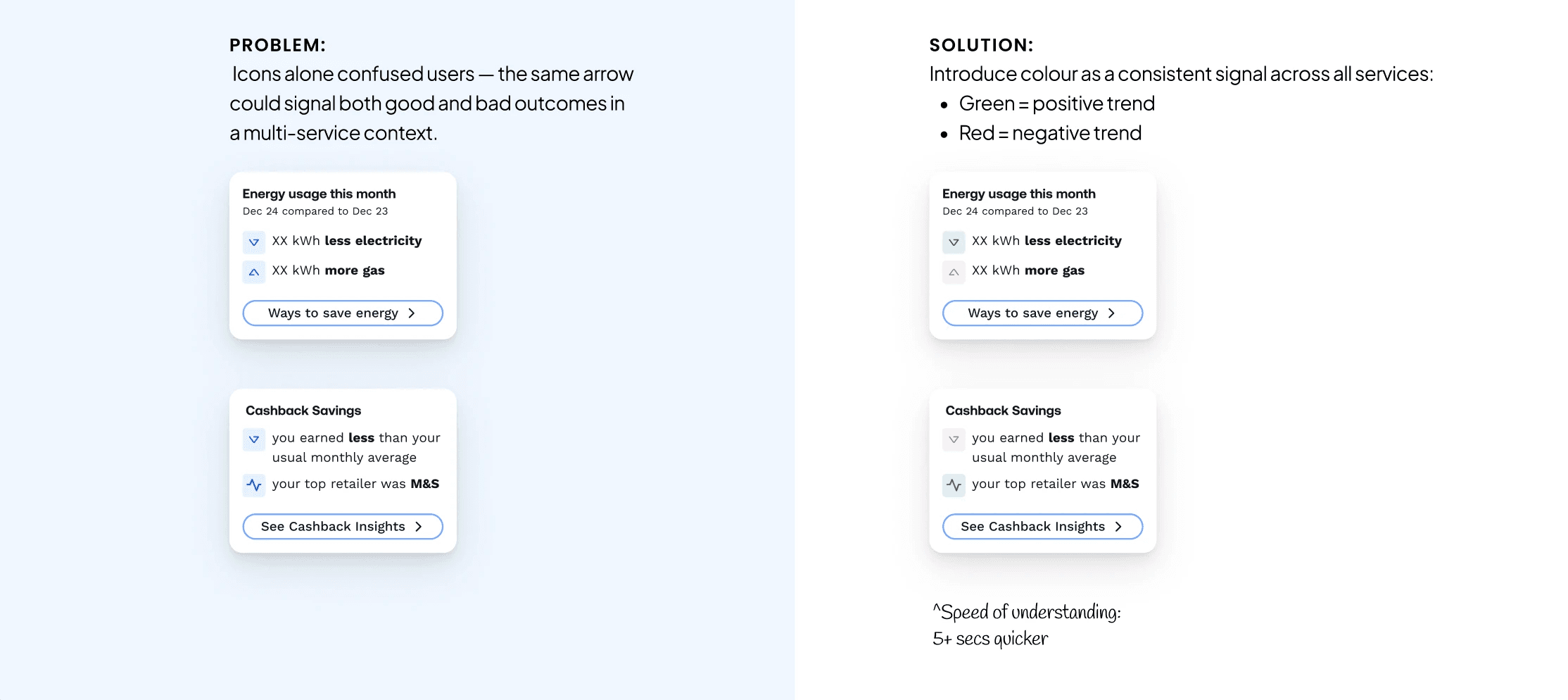
Using Colour for Clarity
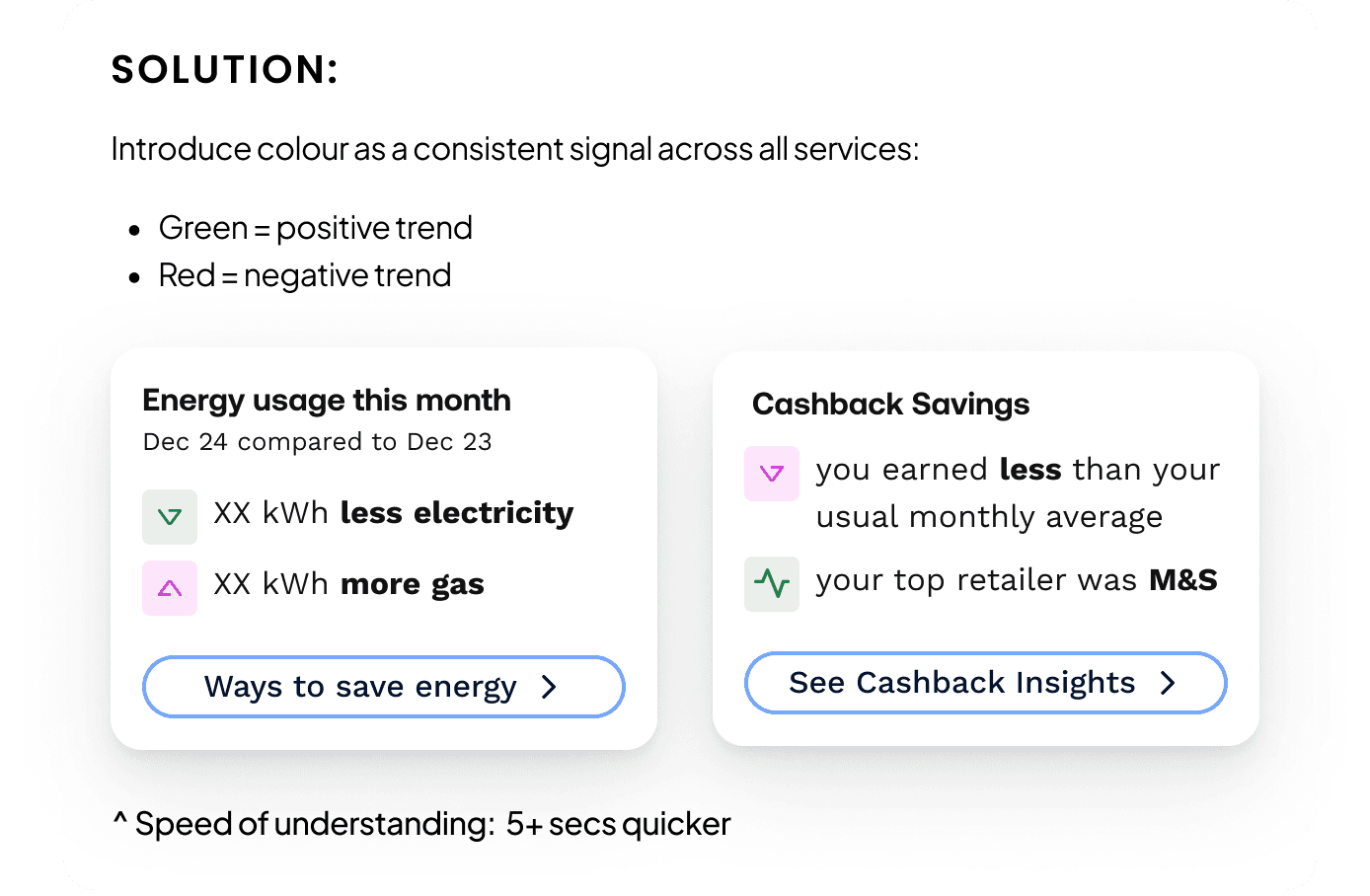
Design Systems initially believed icons alone were enough to convey trends, based on patterns used in cashback.
However, in a multi-service context, the same arrow could mean a positive outcome for cashback but a negative one for energy.
Introducing colour as a consistent signal removed this ambiguity, improving speed to understanding by 5+ seconds and aligning teams on a scalable pattern.
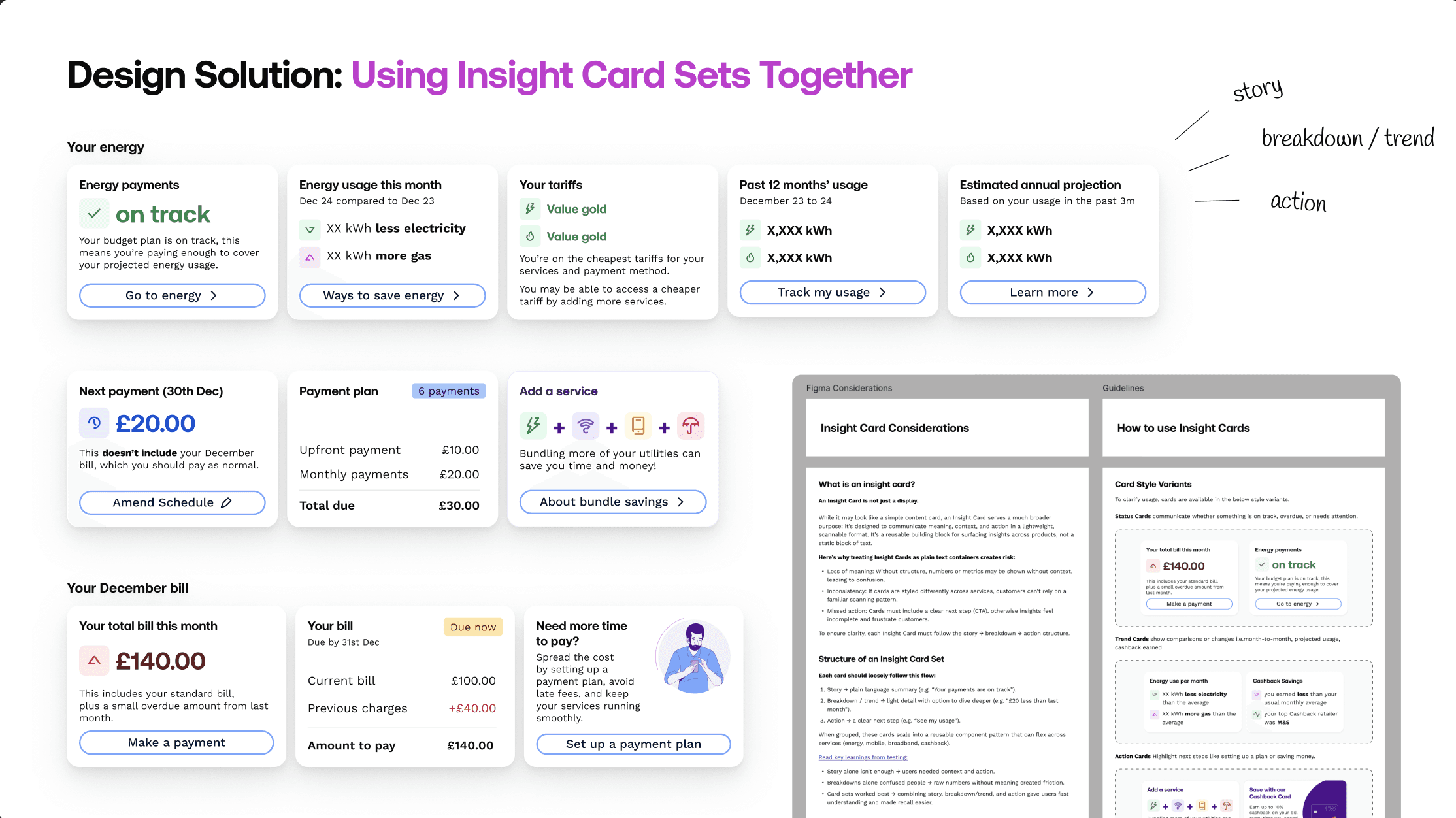
✨ Insight card sets to tell a story
In testing, cards were most powerful when presented as a set.
This structure clarified relationships between balances.
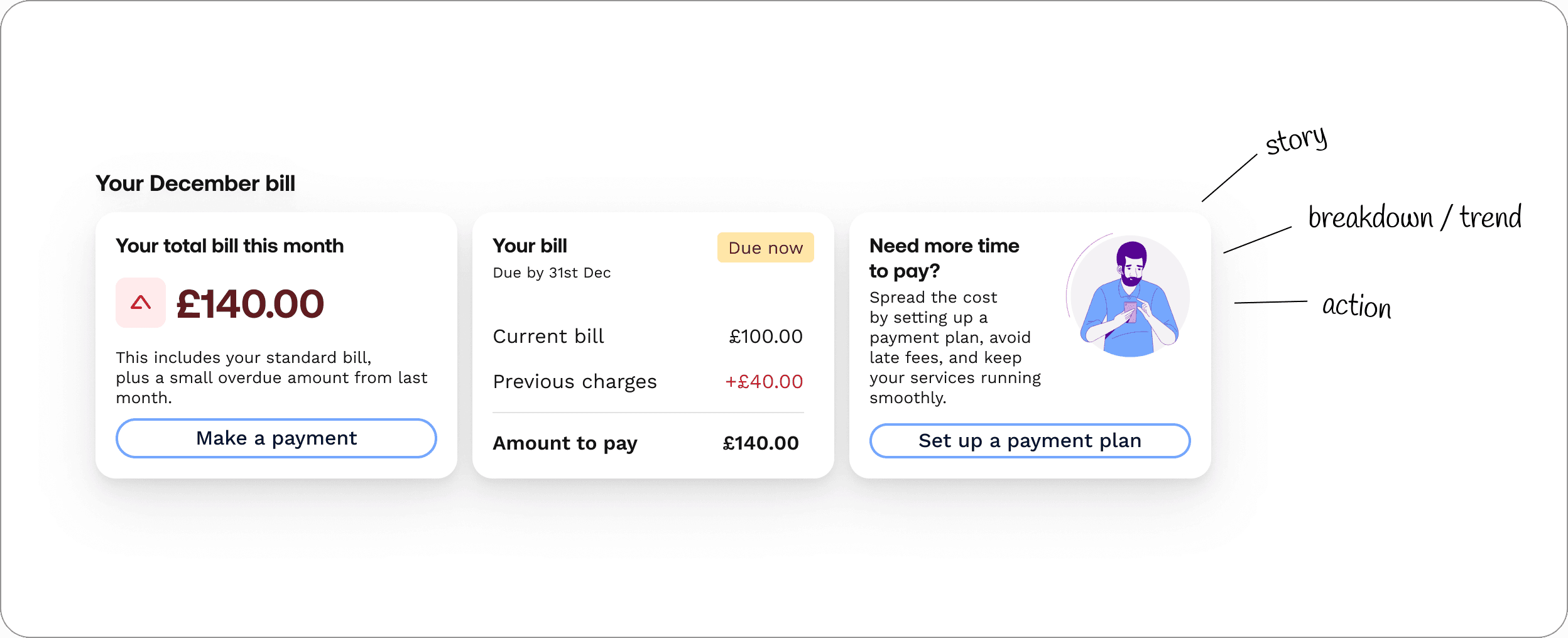
I shared the pattern across the other service designers, and it proved scalable.
Engineering confirmed it was simple to build, so I contributed it to the Design System with usage guidelines.
✨ Story card sets became our standard for presenting insights in-app.
The Full Billing Experience
04 Deliver
05 What we achieved
Reflections
There were things to improve:
The complexity of UW billing meant many edge cases only surfaced once live, we now document these for future use.
On AI summaries, I learned how much trial and error prompt design requires, something I’ll factor into effort next time.
What Went Well
💭 Early feedback from customers, agents, engineers, and stakeholders saved time and helped us land on the right solutions faster.
📲 Reusable components like the header boosted customer propensity to reuse digital.
📑 Finally, we designed the entire billing app experience, starting from a static PDF.
More Case Studies:
5 min read

5 min read
5 min read
5 min read
5 min read
5 min read
5 min read
5 min read
5 min read
5 min read
5 min read
5 min read
5 min read
5 min read
5 min read
5 min read
5 min read
5 min read
5 min read
5 min read
5 min read
5 min read
UTILITY WAREHOUSE
Smart Billing Experience
Designed the digital billing experience at Utility Warehouse to reduce support calls, clarify charges, and introduce AI-powered summaries that help users understand their bills at a glance.
Utility Warehouse's Company Vision:
To simplify life for homeowners by providing all essential services under one roof, delivering value, convenience, and exceptional customer experience through seamless integration and innovation.
My Role
Lead UX Designer
Collaboration
Product
Marketing
Engineering
Data Science
Cross Functional Teams
Strategic Impact
Increased Customer Trust
Reduced Support Calls
Improved Retention
The Problem
The billing experience was seen as overly complex.
Users had to download a PDF to understand their charges — an outdated and unhelpful format.
The Goal
💡Modernise billing by:
Reducing PDF reliance
Lowering support calls
Giving users a smarter, self-serve experience
We focused on the 66% of customers who check their bill digitally before contacting support.
Target Impact
Deflecting up to 5% of total support calls.
What We Achieved
📉 11% drop in billing-related support calls
Users were able to find the answers they needed without calling in.
📈 +73% increase in engagement with billing content in app
More users interacted with their bill digitally — especially via the new summary and insights view.
💬 +36% improvement in comprehension scores (via usability testing)
Participants reported feeling more confident and clear about what they owed, when, and why.
01 Discover
The first part of the process was to understand our users through comprehensive quantitative and qualitative research.
The first part of the process was to understand our users through comprehensive quantitative and qualitative research.
Analysing the internal Call Driver Model 2.0
Analysing the internal Call Driver Model 2.0
As the first step, I analysed our Call Driver Model – which segments customer support calls using OpenAI. These analytics revealed that billing queries are the highest call driver.
Call Listening and Transcript Analysis
Next to understand why customers were contacting support, I reviewed call recordings and transcripts.
Three clear patterns emerged:
Bill increases ▸ Customers didn’t understand why their charges had shifted.
Disputed charges▸ The experience lacked transparency.
Refunds and cancellations ▸ Customers weren’t guided on what to do next.
These findings made it clear: the existing experience was failing customers. I needed to understand how design could change that.

Surveying App Users
To better understand user needs, I surveyed app users to learn what they look for on their bill, what confuses them, and why some return to it multiple times in a month.
These insights helped me identify how to prioritise areas of the design.
Research Interviews
To understand why billing calls were running long, I interviewed both customers and support agents.
When mapped together, both pointed to the same underlying issue: a lack of speed in understanding.
This insight became the core problem my designs needed to solve.
Evaluating the Current Billing Experience
I conducted a UX audit of the current billing experience following our research phase.
Billing had been treated as an afterthought in the app, yet for customers, it was a core part of their experience. As a squad, we knew this was something we had to change.
02 Defining The Problem
02 Define
The research helped me thoroughly understand the problem space and identify a clear problem statement:
Business Opportunity → Design Strategy
66% of customers were already checking their bill in the app before calling support. By containing this group in the app we had a clear opportunity to reduce support calls by around 5%.
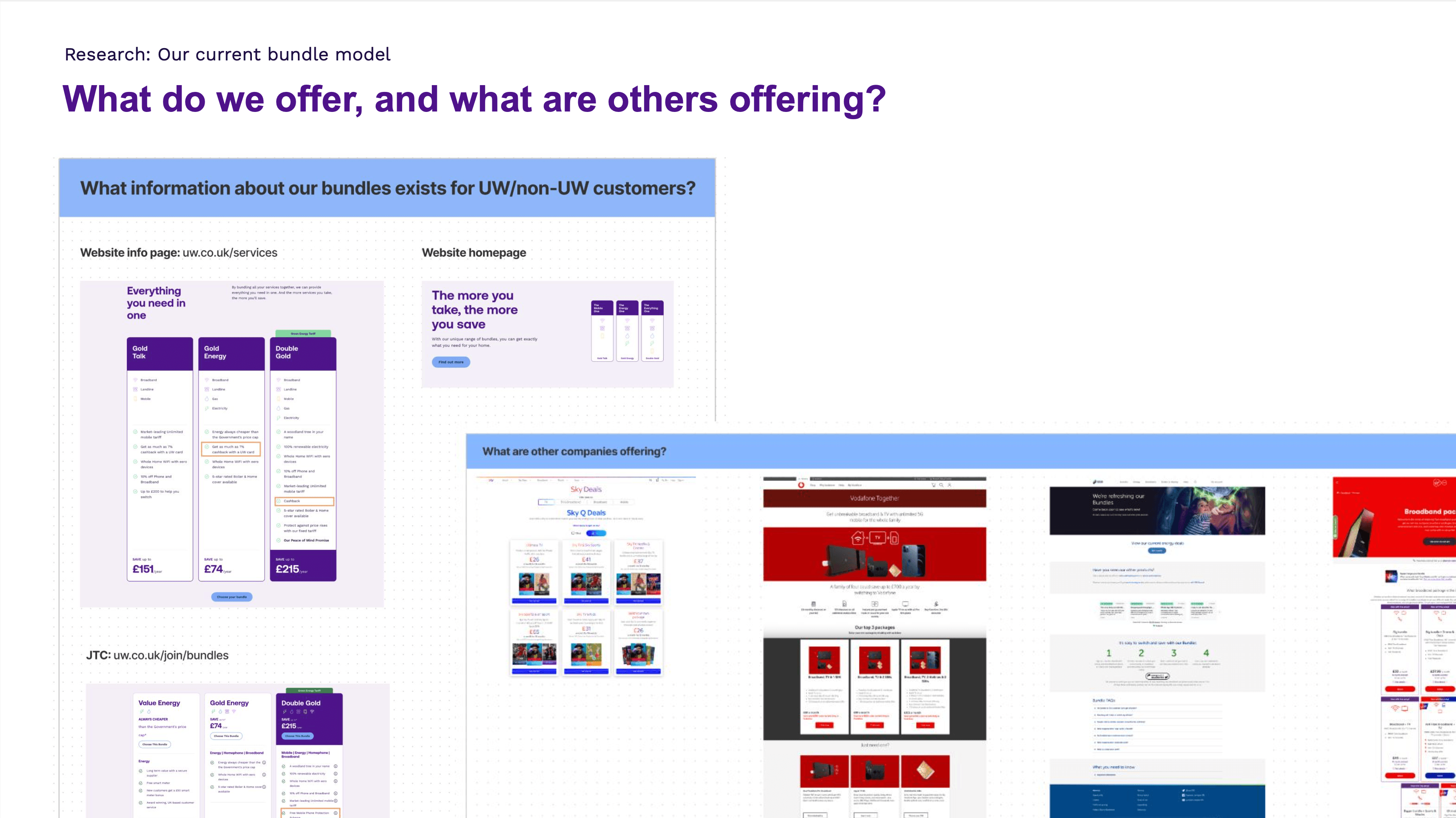
I worked closely with Product to turn this opportunity into a clear design strategy with 5 experience principles.
Design Solutions
Design Solutions
Design Solutions
Design Solutions
Design Solutions
Design Solutions
Design Solutions
Design Solutions
Design Solutions
Design Solutions
Design Solutions
Design Solutions
Design Solutions
Design Solutions
Design Solutions
Design Solutions
Design Solutions
03 Design & Test
With a clear strategy in place, I moved into the design phase.
I explored a range of concepts with the product squad, quickly sketching and testing ideas to understand what delivered the most value for customers and agents.
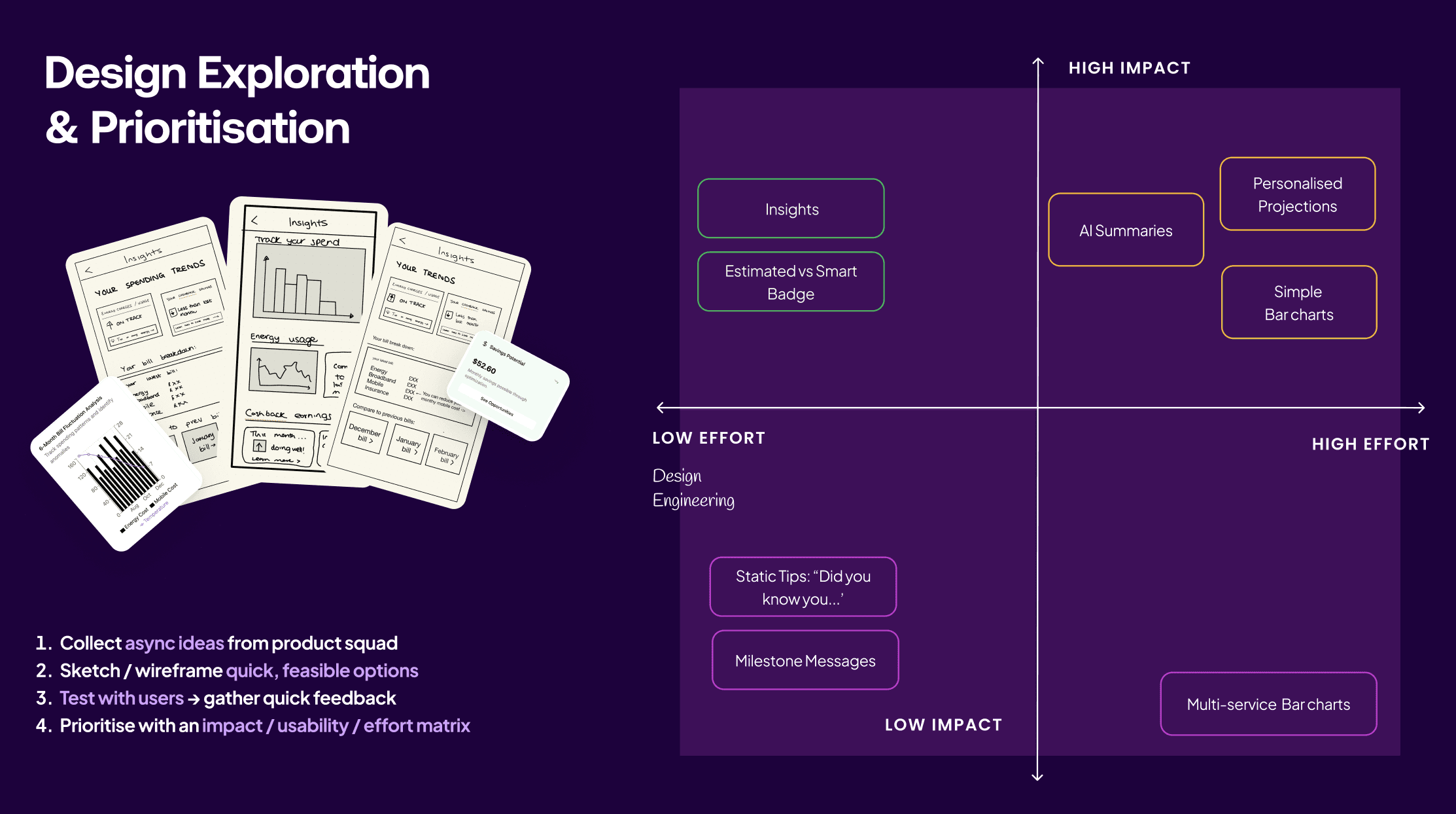
We then prioritised solutions using an impact vs effort lens, balancing user value against design and engineering cost.
Insights as a quick win, using data that was already available
AI bill summaries as a higher-effort but high-impact investment
03 Design & Test
Key Design Decisions
📲 AI Summary Splash Screens
I designed the screens below to bring our strategy to life:
Bill total upfront: Users see their total and due date immediately.
Breakdown + AI insight: We show a clear breakdown and personalised
AI-powered explanation to deliver on our goal of personalisation.
Clear next steps: Guidance on what to do next, to align with our principle of proactively educating customers.
THE PROBLEM
When testing this with UW customers, we found that:
✅ Breakdowns and "Next Steps" worked well
❌ AI insight was missed
THE SOLUTION
To improve this, I designed a typewriter-style animation and retested:
✅ Users noticed the summary and found it to be valuable.
Therefore, we standardised this animation across the app solely for presenting the AI summaries.
👩🏻🔬 Background: Training the AI
I partnered closely with Data Science on prompt design, bringing customer insights from discovery to shape expected outputs. The model was trained to compare past and current bills, then summarise the changes.
Accuracy was validated first with billing experts, then with customer support agents who confirmed, it improved speed to context 🎉
Once we passed an 80% success rate, we were ready to design our first in-app experiment.
🧪 AI Summary Experiments
Experiment 1: Help Centre Pilot
Our first experiment was a simple design placed in the Help Centre, where customers were already seeking billing support.
We targeted 5% of customers whose bills had fluctuated by more than 10%.
The results were encouraging: around 80% of customers who saw the summary didn’t call support, showing real resolution.
A few inaccuracies appeared, but this was expected as quality improves with use and time.
Next, we placed the summaries upfront in the app as originally designed and rolled out to another 5% of customers.
📈 #2 In-APP Billing Insights
I designed an Account Insights space to surface explanations, comparisons, and recommendations.
🎯 Design goal: increase speed of understanding.
✍️ ITERATING THE DESIGN
After gathering the insights from testing, I designed for the most complex scenario first.
To break this down, I explored a few layout patterns, but each one highlighted a clear usability issue.
Scrollable cards
A swipeable set of cards for each balance.
⚠️ What went wrong: Users couldn’t see how the balances related to each other, so they struggled to understand the bigger picture.
Card Stacks
A vertical stack of breakdown cards.
⚠️ What went wrong: Users still couldn’t understand the relationship between the balances at a glance.
Timeline Cards
A linear, month-by-month timeline of balance changes.
⚠️ What went wrong: It worked for billing, but completely fell apart when scaled across multiple services.
Short Story Cards
Focused on meaning over numbers.
✅ In testing, users quickly understood and could repeat back what they’d learned. This “short story” approach became the breakthrough.
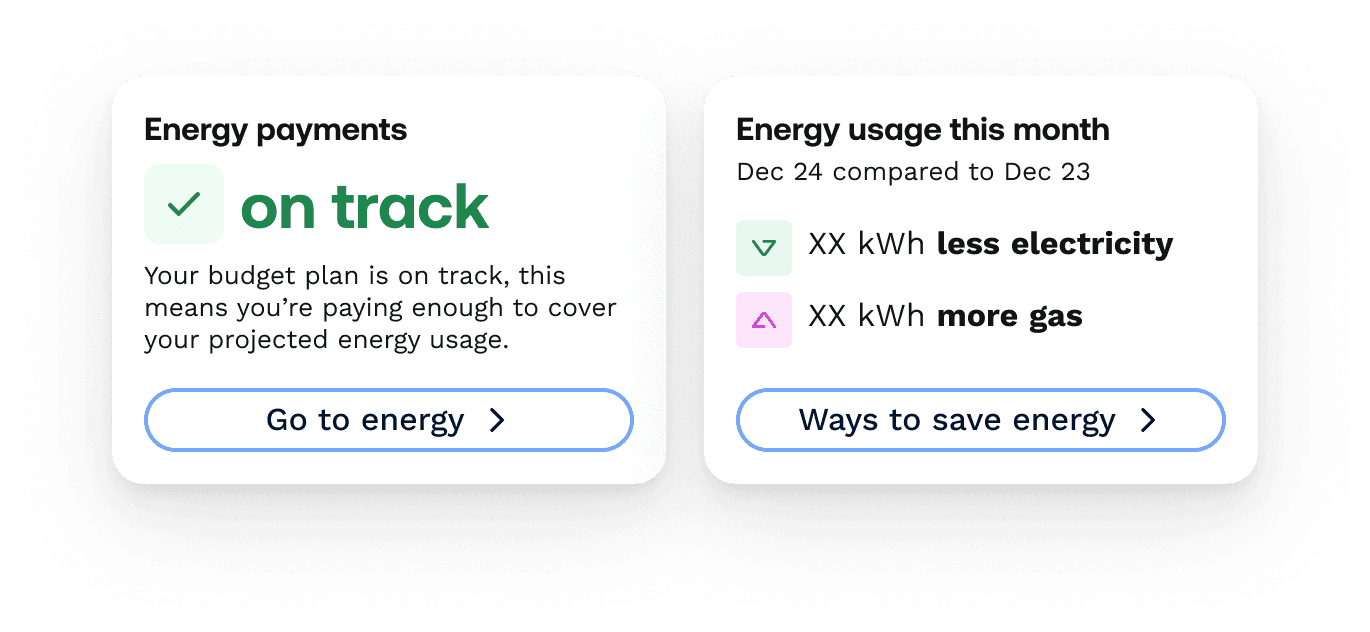
📊 USING COLOUR FOR TRENDS
Our Design Systems team originally believed that icons alone were enough to communicate trends, mainly because our cash back card space already used a simple up/down arrow to show performance:
This improved speed to understanding by 5+ seconds, and I secured alignment with Design Systems to adopt it.
Using Colour for Clarity
Design Systems initially believed icons alone were enough to convey trends, based on patterns used in cashback.
However, in a multi-service context, the same arrow could mean a positive outcome for cashback but a negative one for energy.
Introducing colour as a consistent signal removed this ambiguity, improving speed to understanding by 5+ seconds and aligning teams on a scalable pattern.
✨ INSIGHT STORY SETS
✨ INSIGHT STORY SETS
In testing, cards were most powerful when presented as a set:
In testing, cards were most powerful when presented as a set.
1️⃣ Story
2️⃣ Light breakdown with CTA to dive deeper
3️⃣ Call to action
This structure clarified relationships between balances:
Total due ▸ Bill breakdown + due date + debt ▸ Set-up payment plan
I shared the pattern across the other service designers, and it proved scalable.
Engineering confirmed it was simple to build, so I contributed it to the Design System with usage guidelines.
✨ Story card sets became our standard for presenting insights in-app.
This structure clarified relationships between balances.
✨ Story card sets became our standard for presenting insights in-app.
Engineering confirmed it was simple to build, so I contributed it to the Design System with usage guidelines.
I shared the pattern across the other service designers, and it proved scalable.
#3 Designing High-priority Actions
THE PROBLEM
We needed customers to act with urgency, but testing showed this wasn’t coming through.
So I explored different CTA styles (shown below), but the key learning was clear: urgency wasn’t about button style — without proper hierarchy, actions didn’t land.
THE SOLUTION
We introduced a UW purple header (see below) as a quick, scalable way to create hierarchy.
It flexed across billing use cases:
Main page -> totals and key actions
History -> trends and bill lookup
Insights -> proactive prompts
✅ In testing, this version delivered the fastest task completion rates — users recognised and acted on priorities immediately.
DESIGN SYSTEM CONTRIBUTION
After collaborating with the design systems team, I contributed this header component to the App UI library with usage guidelines, giving squads a consistent space to surface key actions such as top-ups for the Cashback space or urgent price changes for Mobile.
END RESULT
🎉 This design made self-serve far easier across services, directly supporting our goal of reducing support calls.
#4 Adding Billing to the Bottom Navigation
To make billing more accessible, we introduced a dedicated Billing tab in the app’s bottom navigation — positioning it alongside other core journeys such as Home, Help and Cashback Card.
The Full Billing Experience
Once design decisions were finalised, we had a full experience to work towards.
04 Deliver
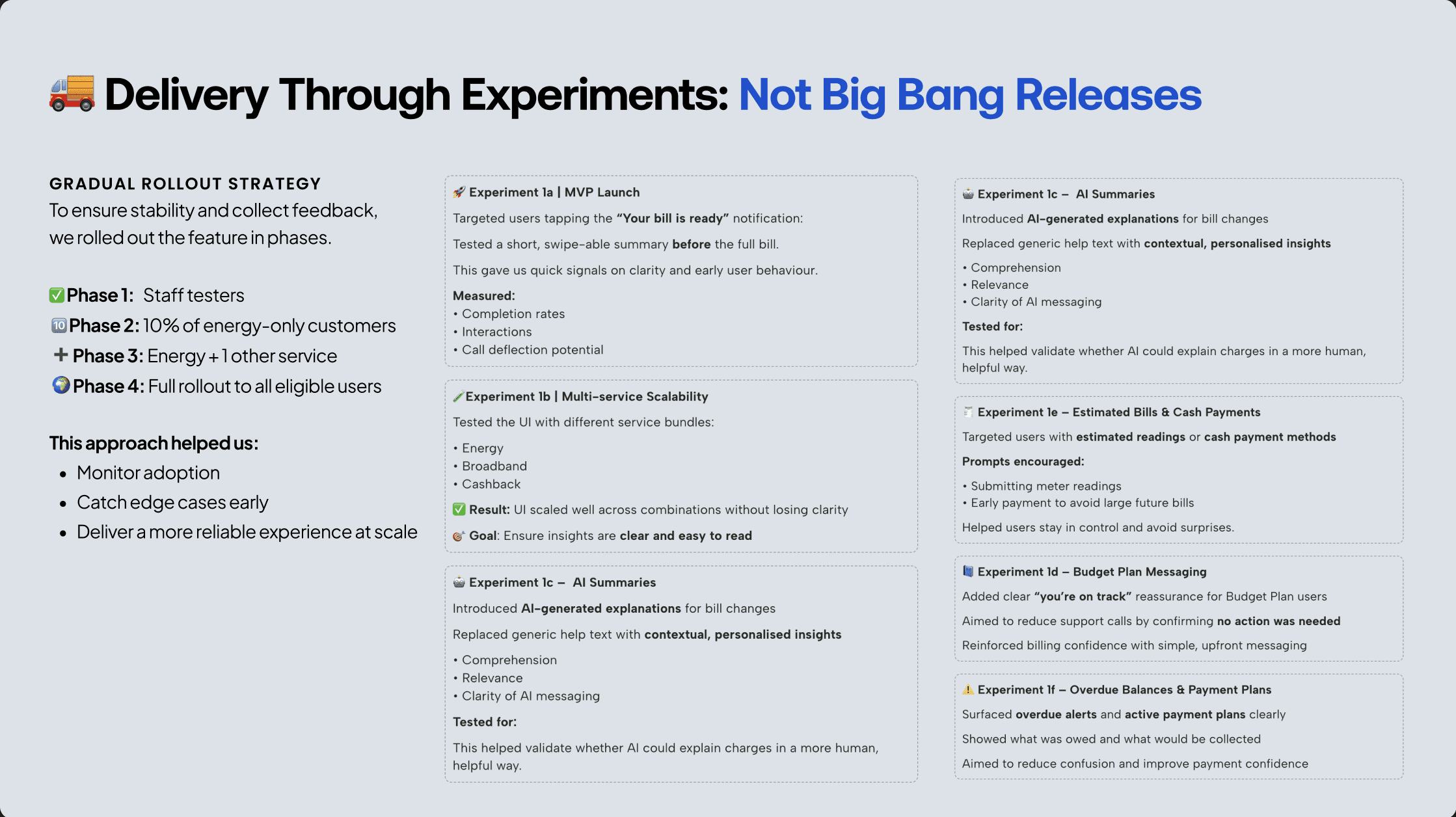
📦 Gradual Rollout Strategy
Because this was uncharted territory, we rolled out through staged experiments, testing, measuring, and optimising before scaling.
Releases went first to staff, then to small complex cohorts like Energy, before expanding further.
I worked closely with engineering to QA, and catch edge cases early.
Overall, this experiment-led approach helped us deliver quickly, learn fast, and reduce risk.
What we achieved
Reflections
There were things to improve:
The complexity of UW billing meant many edge cases only surfaced once live, we now document these for future use.
On AI summaries, I learned how much trial and error prompt design requires, something I’ll factor into effort next time.
What Went Well
💭 Early feedback from customers, agents, engineers, and stakeholders saved time and helped us land on the right solutions faster.
📲 Reusable components like the header boosted customer propensity to reuse digital.
📑 Finally, we designed the entire billing app experience, starting from a static PDF.
More Case Studies:
5 min read
5 min read
5 min read
5 min read
5 min read
5 min read
5 min read
5 min read
5 min read
5 min read
5 min read
5 min read
5 min read
5 min read
5 min read
5 min read
5 min read
5 min read
5 min read
5 min read
5 min read
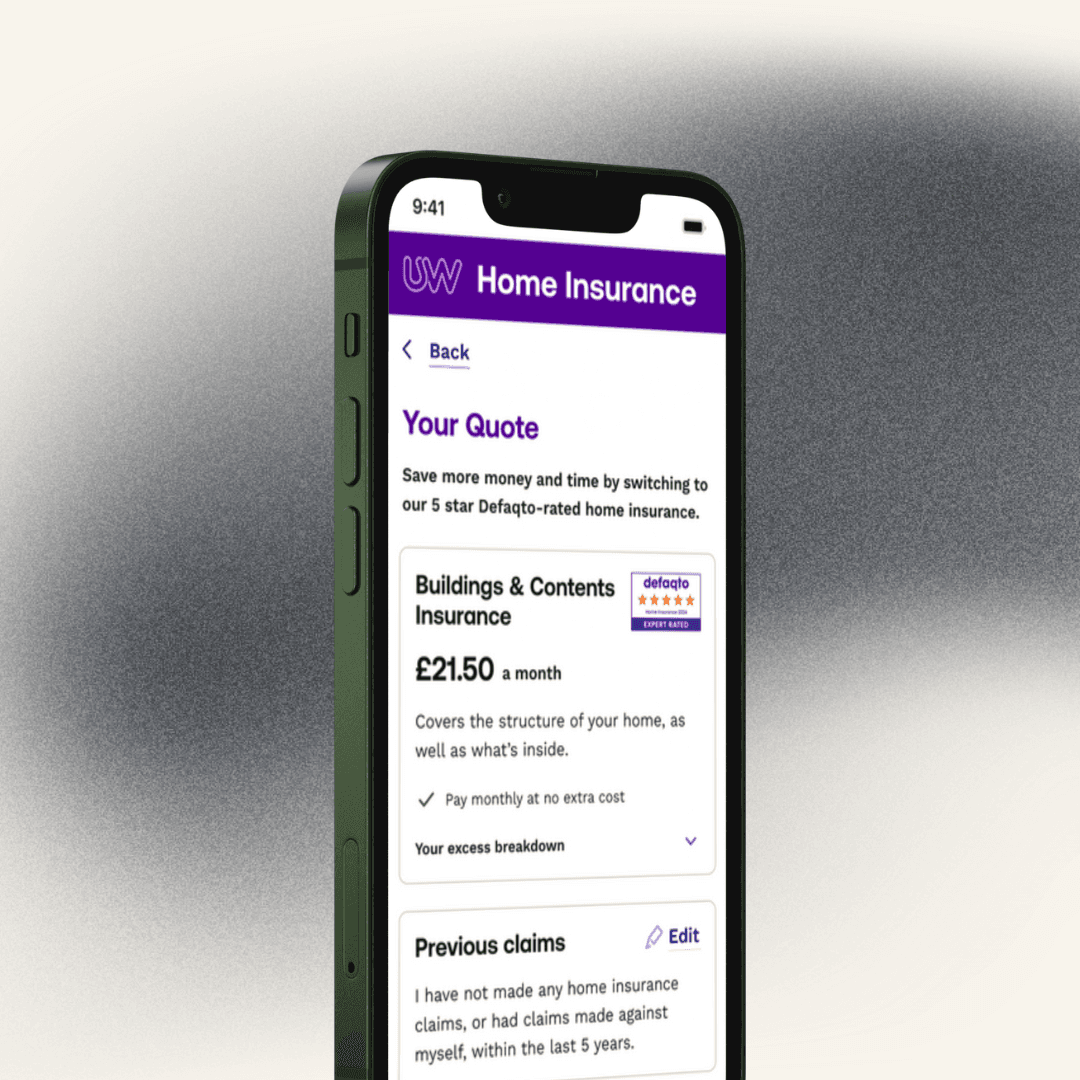
UTILITY WAREHOUSE
AI-Powered Home Insurance
UX/UI •
FINANCIAL SERVICES •
WEB